Who I've shared with
You see every organisation you have shown information to, and what you shared when, in one list; from here you can ask for deletion or report.
Topics in this guide
Steps
Step 1: Settings → Who I've shared with
The “Who I've shared with” button in the History tab opens the same list.
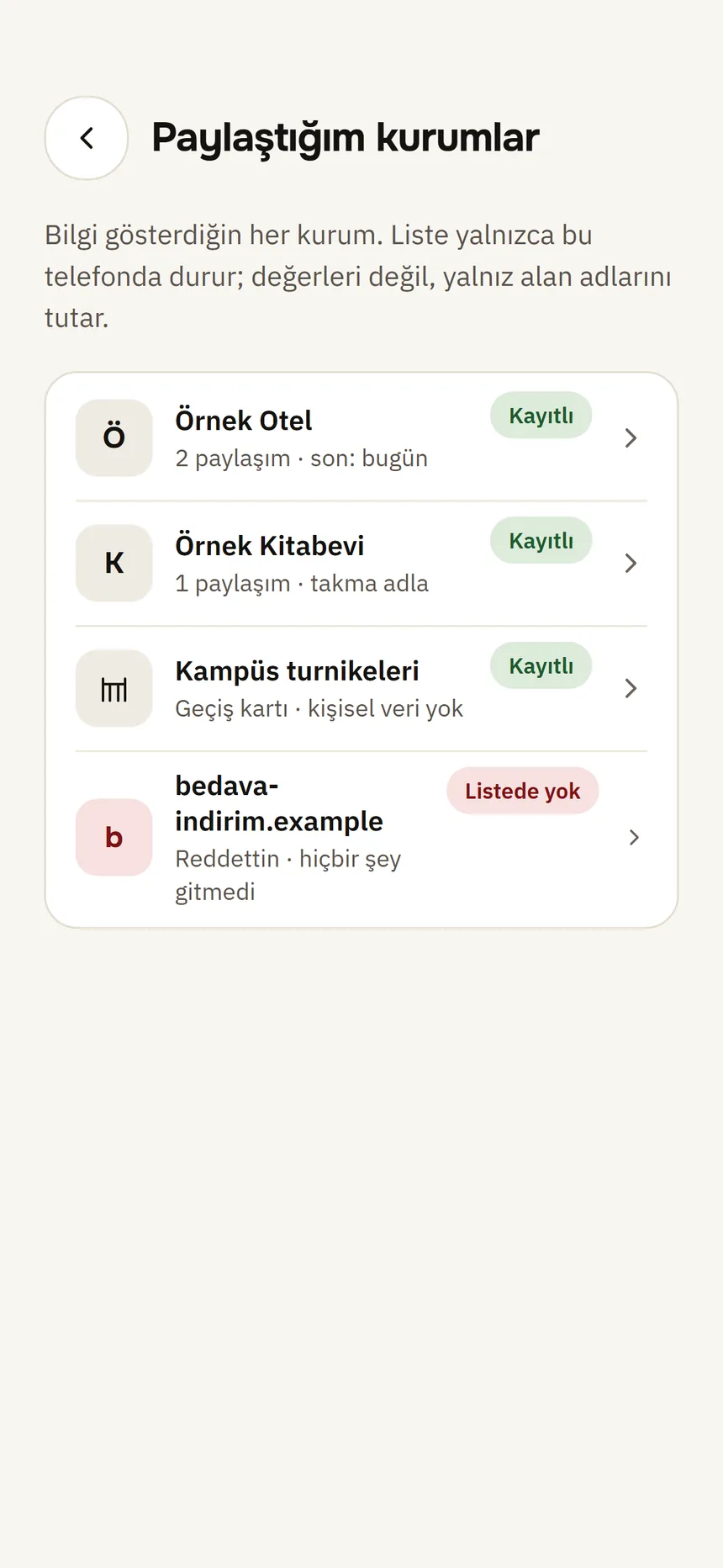
Shared with Step 2: Read the list
Each row shows the organisation, the number of shares, the last share and its registration: Registered, Not in the trusted list or Couldn't check.
Step 3: Tap an organisation
You see the names of the fields that went to it, your pseudonym on that site, “Your requests” and all shares.
Step 4: Start a request if needed
At the bottom: Ask them to delete my data and Report to the data protection authority: Ask for deletion or report.
Good to know
- The list stays on this phone and holds field names, never the values.
- Organisation names and registration status are read from the signed trusted list; if it cannot be read, it says “Couldn't check”.
Related guides
- Ask an organisation to delete your data, or report itYou can ask an organisation you showed information to to delete your data, or report a suspicious request to the data protection authority. The wallet prepares the text; you send it.
- Check your activity historyThe History tab lists who you showed which fields to and when, and which credentials you received; the log stays on this phone only.
- Manage your pseudonymsEach site you signed in to with “Sign in with Tamga” has its own pseudonym; you can give them names for yourself or delete them.