Manage your pseudonyms
Each site you signed in to with “Sign in with Tamga” has its own pseudonym; you can give them names for yourself or delete them.
Topics in this guide
Steps
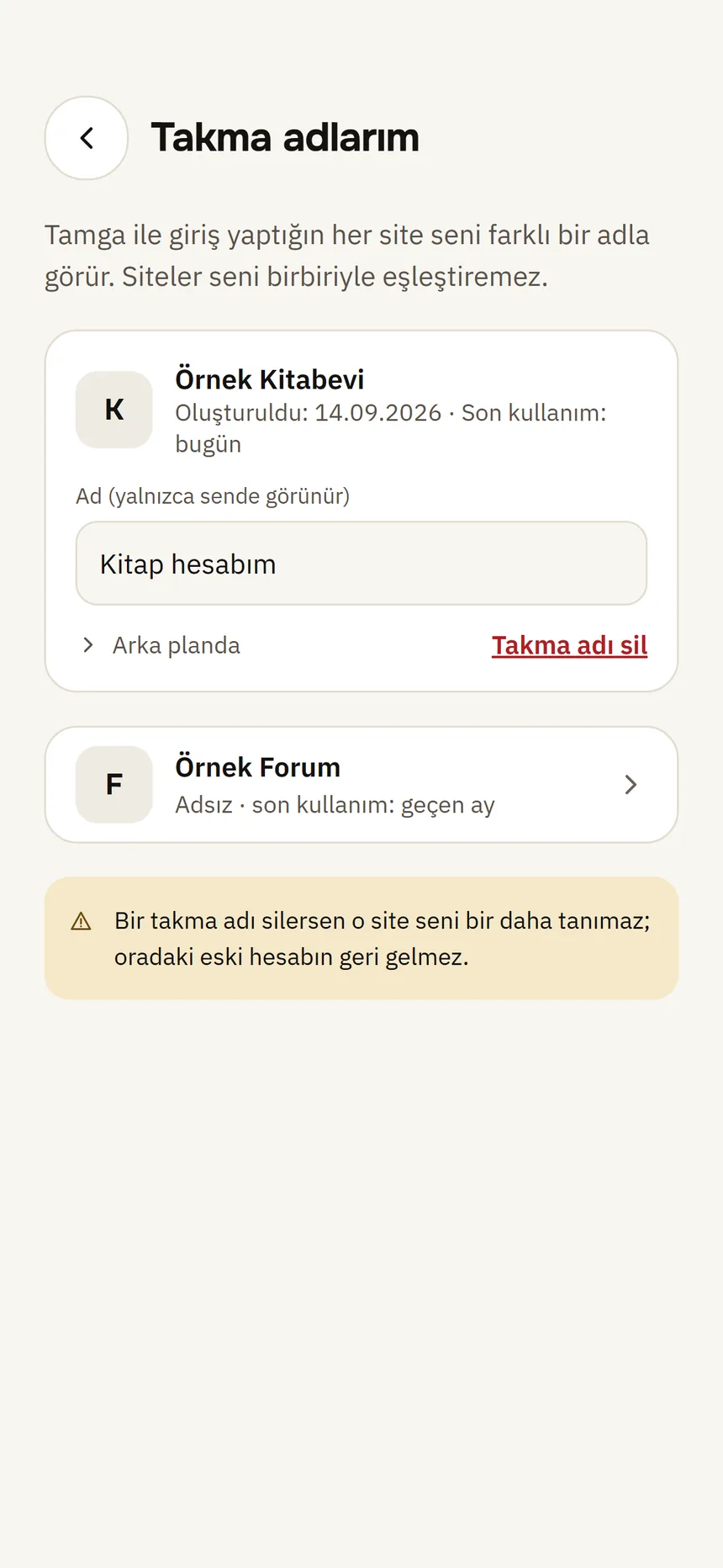
Step 1: Settings → My pseudonyms
One card per site: the site's name, when it was created and last used.
Pseudonyms Step 2: Give it a name if you like
Type in “Name (only you see it)” (e.g. work account). The name does not go to the site.
Step 3: To delete it, tap Delete pseudonym
Confirm “Delete this pseudonym?”.
Good to know
- Each site sees a different pseudonym, so sites cannot match you.
- If you delete a pseudonym, that site will no longer recognise you with it; if you sign in again a new pseudonym is created and your old account there is not recovered.
- The pseudonym's value is not shown on screen; it only goes to the site.
Related guides
- “Sign in with Tamga” and a pseudonym per siteWhen you choose “Sign in with Tamga” on a website, the wallet uses a pseudonym only for that site; your ID number is not shared and sites cannot link you.
- Who I've shared withYou see every organisation you have shown information to, and what you shared when, in one list; from here you can ask for deletion or report.