Your identity on your phone: who holds what?
Five parties take part when your documents are in Tamga Wallet. What the institution, you, the verifier, the network and the wallet provider hold and see.
By: Tamga Wallet team9 min read
When your documents live in Tamga Wallet, five parties are involved: the institution that issues a document, you with your wallet, the verifier that asks for it, Tamga Network that keeps the trust list, and the wallet provider that vouches for your app. Only you see everything. The institution knows what it issued but not where you show it; the verifier sees only the fields you approve; the network publishes lists and learns nothing about you; the wallet provider holds a technical record of your app, not your documents.
Below, each party in turn: what it holds, what it can see, and what it cannot.
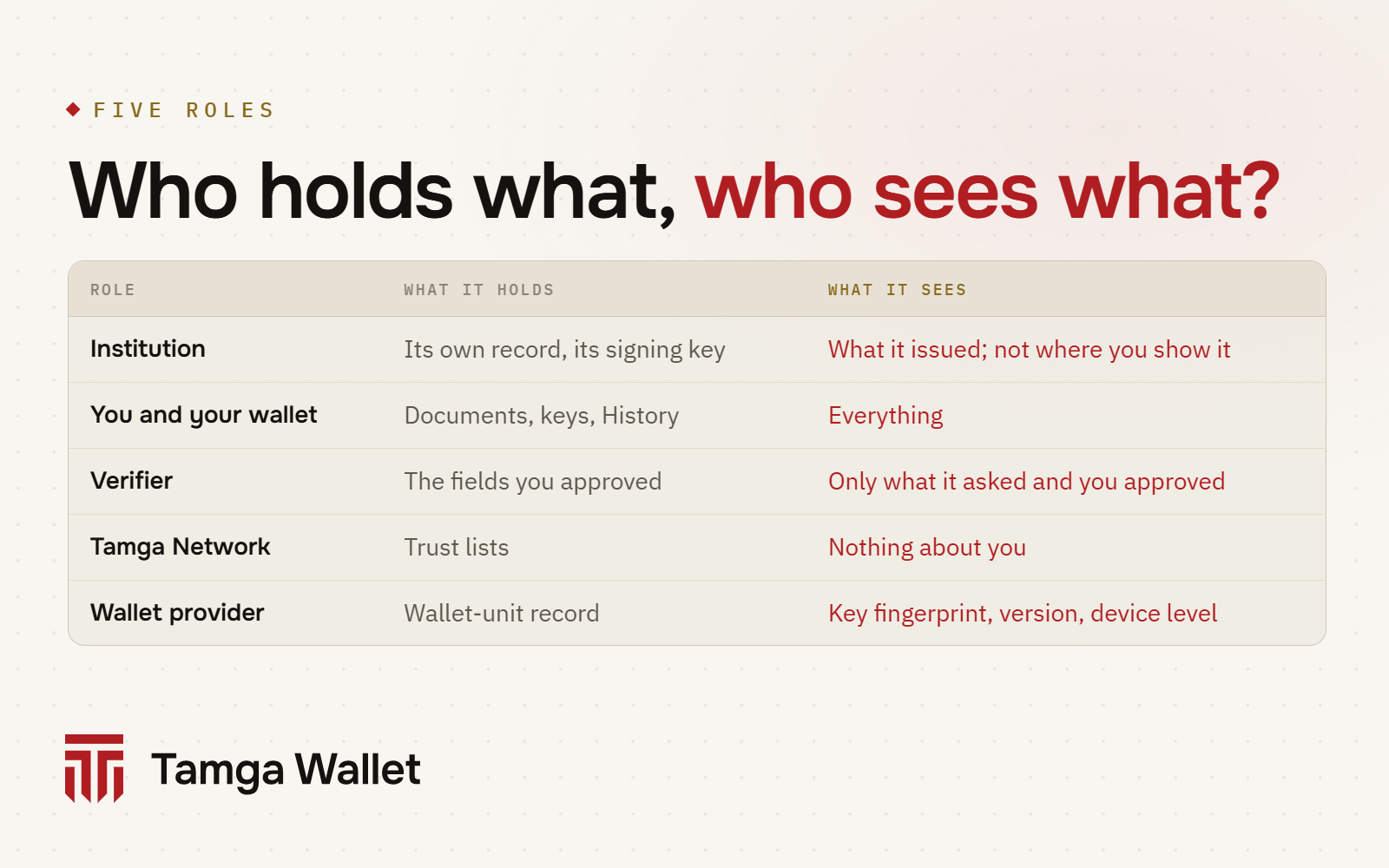
Who are the parties when you use a digital identity wallet?
A paper diploma involves two parties: the university that printed it and the person you hand it to. A document in a digital wallet involves a few more, because the checks that used to be a phone call to the university now happen automatically.
| Party | Example | Its job |
|---|---|---|
| Institution (issuer) | your university, an event organiser | issues and signs the document, revokes it when needed |
| You and your wallet | Tamga Wallet on your phone | keeps the document, asks for your approval, shows it |
| Verifier | an employer's website, a discount page, a door reader | asks for a document and checks it |
| Tamga Network | the trust list | says which institutions and verifiers are registered |
| Wallet provider | the service behind Tamga Wallet | proves to institutions that the app is a genuine, secure wallet |
In Tamga Network's framework one organisation can hold more than one role. A ticket seller, for example, issues tickets and also checks them at the gate. It registers separately for each role and follows the rules of each.
What does the institution hold, and what does it see?
The institution holds two things: its own record about you (the student register, the ticket sale) and the key it signs documents with. That key stays with the institution. Tamga Network's rules say the network never holds an institution's signing key, even when it hosts the issuing software for that institution.
When you receive a document, the institution sees what you would expect: that it issued a document to a wallet. Some institutions first ask who you are; for that you show the identity credential already in your wallet, and the institution matches it with its own record.
What the institution does not see is what happens after. When a verifier checks whether your diploma has been revoked, it does not ask the university. Revocation lists are published in advance, and verifiers download and cache them before any check. The university therefore cannot tell where, when or how often you showed your diploma. The EU regulation behind digital identity wallets asks for the same thing: a wallet must not give the issuer any information about how its documents are used (Regulation (EU) 2024/1183, Art. 5a(5)(b)).
What do you and your wallet hold?
You hold everything that is yours:
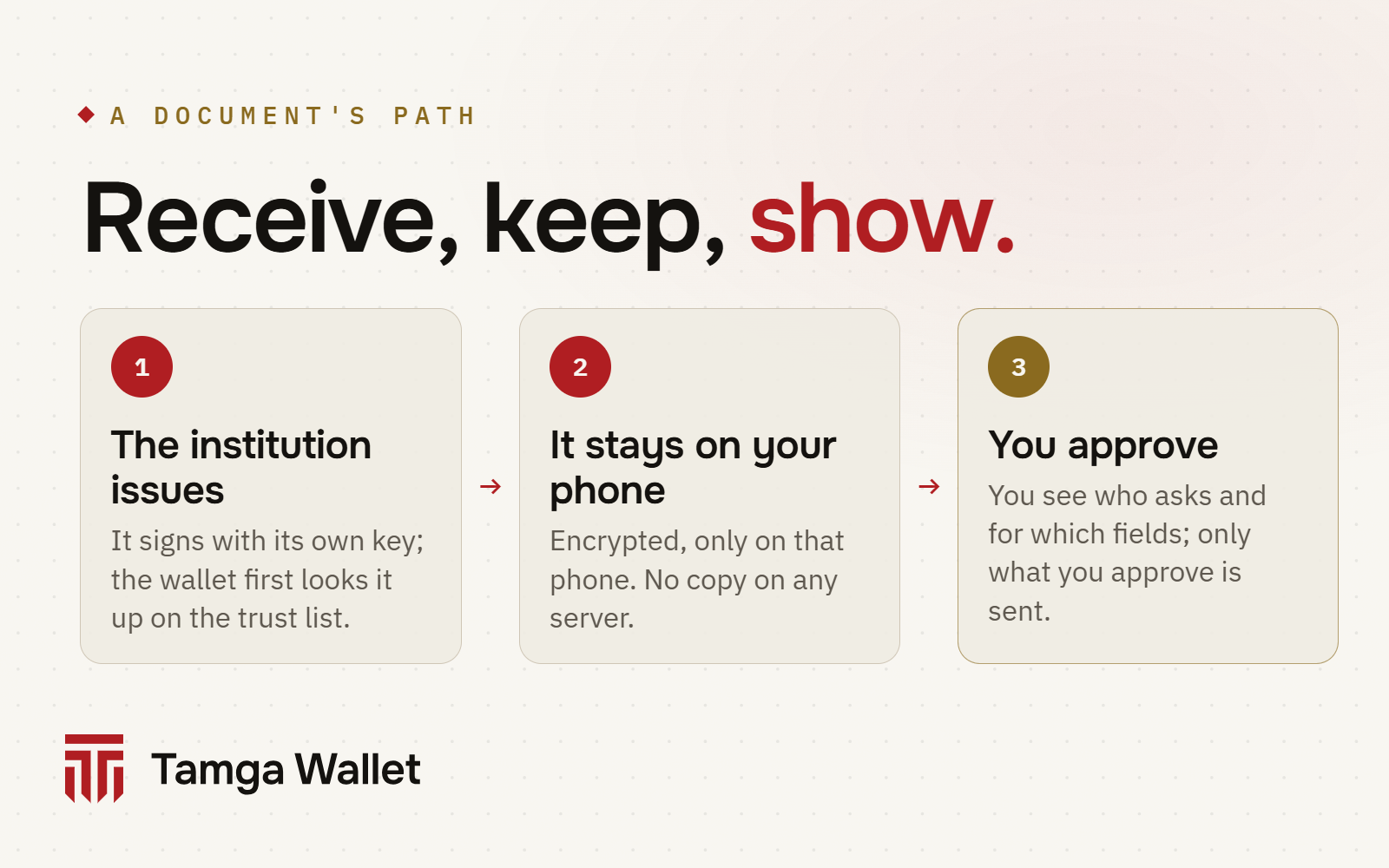
- The documents themselves, encrypted on the phone. The encryption key exists only on that phone, so a copy that ends up in a phone backup cannot be read.
- The keys that show them. Each document is bound to a key created in the phone's key store (Secure Enclave on iPhone, Keystore on Android). The key never leaves the phone. Someone who copies your document cannot show it in your place.
- Your history. Which document you showed, to whom, with which fields and when is recorded in History, on your phone only. It does not go to a server or a server backup. See Activity history.
There is no account and no password. You open the wallet with a 6-digit PIN that stays on the phone, and you approve every sharing with the phone's own lock: face, fingerprint or phone passcode.
What does the verifier see?
The verifier sees only what it asked for and you approved. When a site asks for a document, the wallet shows you who is asking, which fields and for what purpose. Tap Share, confirm with your phone lock, and only those fields are sent. If you do not approve, nothing goes.
A few details make this stronger than it sounds:
- Fields are hidden one by one. A document is built so that each field can be left out (selective disclosure). If a job application only needs "graduated" and "degree", your grades and student number stay on the phone.
- Each verifier gets its own copy. The wallet keeps several copies of each document and always gives the same verifier the same copy, and different verifiers different copies. Two verifiers comparing notes cannot match you by the document's signature or key (why).
- "Sign in with Tamga" uses a separate pseudonym for each site. Your ID number is not shared.
- Age can be proven alone. If a site asks only "over 18?", the answer is proven without your date of birth, your name or the credential itself: Prove your age, and the background in Proving your age without showing your date of birth.
What the verifier keeps after that is its own business, under its own privacy rules; the wallet cannot delete it. What the wallet can do is help you ask. From History you can send the organisation a "delete my data" request, or report a suspicious request to the data protection authority: Ask to delete.
If a verifier is not on the trust list, or asks for more than its registered purpose allows, the wallet shows a red warning and holds the Share button for a few seconds. You never have to share: Unregistered verifier.
What does Tamga Network see?
Tamga Network keeps the rules and the signed trust lists. The list says which institutions are registered, which document types each may issue, which verifiers are registered and for what purpose, and which wallet providers are recognised.
Your wallet downloads these lists as public files. Nothing about you is sent when it does. The same goes for document type catalogues and revocation lists: they are public and downloaded whole.
The network does not run Tamga Wallet. Tamga Wallet is a separate product by a separate company and the first wallet on the network. It is listed on the trust list the same way any other wallet would be: Tamga Wallet and Tamga Network.
Two network services are worth naming, because you may meet them:
| Network service | When you meet it | What reaches it |
|---|---|---|
| Identity service | when you choose to get an identity credential | images of your ID card and face go from the verification page straight to Tamga Network and its verification provider; they never reach Tamga Wallet |
| Tamga Verify (hosted verifier) | when an organisation uses it to check documents | only the fields you approve, on behalf of the organisation that asked |
For these services Tamga Network is the controller and its own privacy notice applies.
What does the wallet provider see, and what not?
The wallet provider is the service behind the app. Its job is narrow: register your wallet unit, check the phone's device attestation, and sign short statements that tell institutions "this is a genuine Tamga Wallet, and its keys are in secure hardware". It also lets you close your wallet if your phone is lost.
According to Tamga Wallet's privacy policy, this is what the wallet provider keeps:
- a fingerprint of the wallet unit's key, the app version, the registration time and whether the wallet has been revoked;
- the result of the device attestation check, which is only a level: keys in the phone's secure chip, or in software;
- optionally, a one-way fingerprint of your revocation code (never the code itself).
That record contains no name, phone number, email address, ID number or device identifier. The wallet provider does not see your documents, your history, the fields you share or the sites you share with. Its server logs do not record IP addresses. The app has no ads, no analytics and no crash reporting, and notifications are created on the phone rather than sent from a server.
This matches what the EU regulation asks of wallet providers: collect only what is needed to provide the wallet, and do not combine it with other data (Regulation (EU) 2024/1183, Art. 5a(14)).
Who can revoke a document, and who finds out?
Only the institution that issued a document can revoke or suspend it. When online, your wallet checks the institution's revocation list by itself; the badge on the document shows Valid, Revoked, Suspended or Not verified, with the time of the last check: Credential status.
A verifier checks the same list when you show the document. Because the list is fetched in advance and in full, neither the institution nor the network learns which document was checked (how status lists work).
Frequently asked questions
Can Tamga see my documents?
No. Documents are stored encrypted on your phone, and neither the wallet provider nor Tamga Network receives them. The issuing institution keeps its own record, and a verifier keeps what you approved for it.
Does the university know when I show my diploma to an employer?
No. The employer checks the university's signature and its published revocation list without contacting the university, so the university does not learn where or when the diploma was shown.
What does the wallet provider know about me?
A technical record of your wallet unit: a key fingerprint, the app version, the registration time, the revocation status and the device attestation level. No name, phone, email, ID number or device identifier.
Where is the list of who I shared with?
Only on your phone, in History. You can export it as a password-protected file when you move to a new phone. It never goes to a server.
Can a website see more than the approval screen showed me?
No. Only the fields you saw and approved are sent. If a site asks for something outside its registered purpose, the wallet warns you separately.
Sources
- Regulation (EU) 2024/1183 (eIDAS 2.0), Article 5a — wallet requirements, including 5a(5)(b) and 5a(14)
- Tamga Network documentation: trust lists, revocation, privacy
- How it works · Security · Privacy policy
Related
- Article · PrivacyNo central database: why your data isn't in one placeYour documents stay on your phone, the institution keeps its own record and the network keeps only a list of trusted institutions.
- Article · PrivacyShowing the same document twice: why the two can't be linkedTamga Wallet gives each verifier its own copy of a document and each site its own pseudonym, so two places can't match you by comparing notes.
- Article · ConceptsWhat happens on your phone when a document is revoked?Institutions publish document status in a signed list. Your wallet checks it by itself, and the issuer never learns where you showed a document.
- GuideCheck your activity historyThe History tab lists who you showed which fields to and when, and which credentials you received; the log stays on this phone only.
- GuideUnregistered verifier and excessive request warningsIf the requester is not in the Tamga trusted list, or asks for more than its registered permission, the wallet shows a red warning; you do not have to share.
Step-by-step help is in the Guide
Everything from setup to a lost phone, with the app’s own screens.
Get Tamga Wallet
On the App Store and Google Play. Carry your diploma, student card and tickets on your phone.