Showing the same document twice: why the two can't be linked
Tamga Wallet gives each verifier its own copy of a document and each site its own pseudonym, so two places can't match you by comparing notes.
By: Tamga Wallet team8 min read
When you show the same document to two places, Tamga Wallet sends each of them a different copy of it, signed by the institution and bound to a different key on your phone. So the two places see nothing technical in common that they could compare to say "this is the same person". On sites where you sign in with Tamga, each site gets its own pseudonym for the same reason. What links you is only what you choose to reveal, such as your name.
What does "unlinkable" mean for a document?
Suppose you show your student card to a cinema for a discount and, a week later, to a software shop. Each of them only learns "this person is a student". But if both kept a record and later compared them, could they work out that the two records belong to the same person?
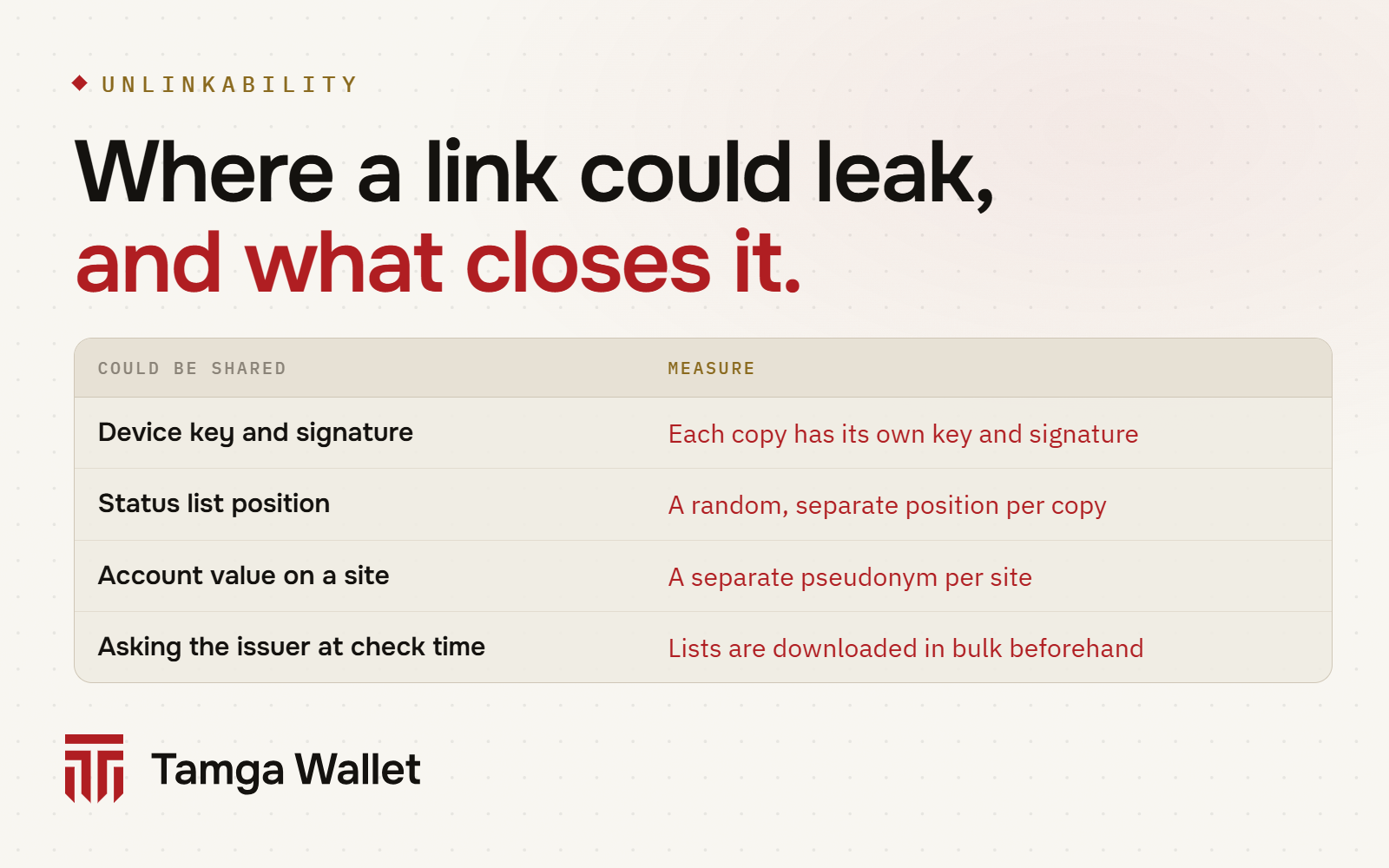
With a paper card or a PDF, often yes: the same document number, the same photo, the same file. With a digitally signed document the risk is subtler. Even if you only reveal "is a student", a signed document carries some technical values in the clear: the institution's signature itself, the public part of the key your phone uses to prove the document is yours, and the document's position in the institution's revocation list. If those values were the same every time, they would work like a hidden serial number.
Unlinkability means two (or more) parties who received your document cannot match their records through anything you did not choose to reveal. The EU's digital identity regulation asks wallets for exactly this: Article 5a(16) of Regulation (EU) 2024/1183 requires privacy-preserving techniques that ensure unlinkability where identification is not needed, and forbids issuers or anyone else from tracking or correlating how the user uses an attestation after it was issued.
How does Tamga Wallet keep two presentations apart?
The wallet does three things.
It holds several copies of each document
When you receive a document from an institution, the app does not get one document but a batch. On the progress screen you see "getting 10 copies signed". The network's issuing rules fix the batch at 10, and each copy is bound to a different device key. The institution checks this and refuses a request where the keys repeat, because copies with the same key could be linked to each other and the batch would be pointless.
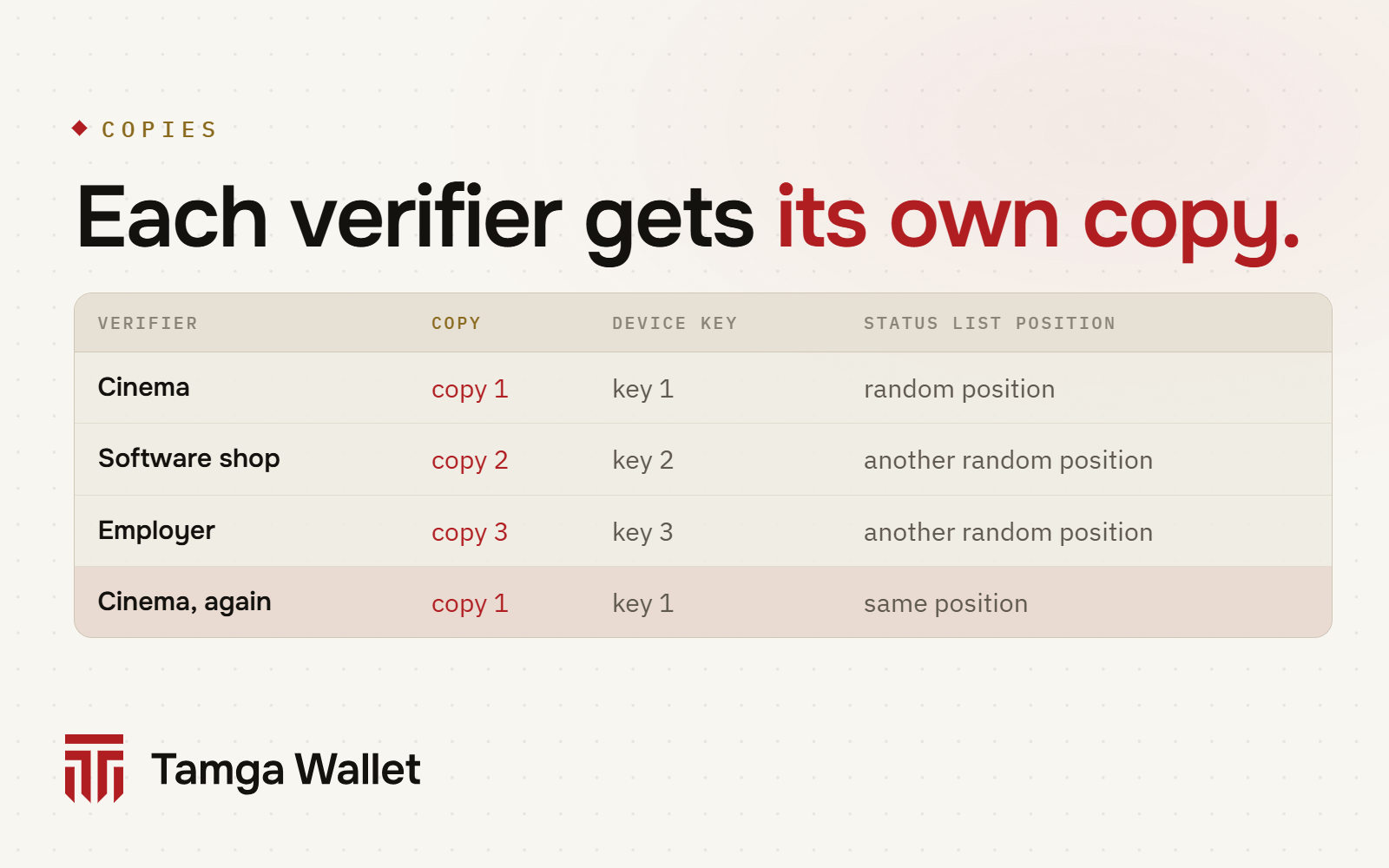
For documents that can be revoked, each copy also gets its own position in the institution's status list, chosen at random. Nobody outside the institution can tell that those positions belong to one document.
It gives each verifier its own copy, and the same verifier the same copy
The rule is simple, and in the app's document details you read it in one sentence: "Each verifier gets its own copy; the same verifier always sees the same copy, so different verifiers cannot link you."
Why the same copy to the same verifier? Because a place you already showed a document to already knows you were there; a new copy would not hide anything from it, it would only use up copies. The wallet also keeps the set of fields consistent: if you shared six fields with a verifier last time, it does not share eight this time, because a changing set reveals what is being hidden.
It gives each site its own pseudonym
"Sign in with Tamga" does not send a site your ID number or any fixed account value. The wallet derives a separate pseudonym for each registered site. The site recognises you every time you return, but two sites see two unrelated values. You can see your pseudonyms under Settings → My pseudonyms, give them a name that only you see, or delete one: Manage your pseudonyms.
The pseudonyms come from a seed that the identity service derives from your identity. That is why, when you verify your identity again on a new phone, the same pseudonyms come back and your accounts are not lost.
What happens when the copies run out?
Copies are spent only on new verifiers; places you already showed the document to keep seeing their own copy. When few copies are left, the home screen tells you, and you can get new copies of the same document from the institution.
If no copies are left and a new verifier asks, the wallet does not decide for you. You can refresh, or reuse an old copy. If you choose to reuse, it shows a separate linkability warning saying how many verifiers have already seen that copy and that, if they combined their data, they could identify you as the same person.
Some institutional documents can renew their copies by themselves, but only while the app is open and unlocked, after a random delay, and only if the institution supports it. You can turn this off under Settings ("Refresh copies automatically"). Identity and contact credentials are never renewed automatically; you always do that yourself.
Does the institution find out where I showed the document?
No. A verifier checks a document without asking the institution (what happens when a document is revoked). It checks the signature against Tamga Network's signed trust list and looks up revocation in the institution's status list, which it downloads at regular intervals and keeps in a cache. The network's rules forbid fetching the list at the moment of verification, because the institution would then learn "someone is checking one of my documents right now", and the requester's address would give the verifier away.
The wallet follows the same idea. To notice that one of your documents was revoked or is about to expire, it downloads public lists; no information about you is sent, and the notification is created on your phone. At presentation time it does not contact the schema server either.
How does the revocation list stay private?
A status list is a long string of bits; each document copy has one position in it. A list like that can leak in quiet ways, so the network's status list specification adds rules:
- Positions are chosen at random. A counter would reveal enrolment order: position 12 would be the twelfth person to get a document.
- A list has at least 100,000 positions. A valid document and an unused position carry the same value, so a new list does not single out its first holders.
- The list's address is a meaningless random string, never something like a year or a faculty name.
- Lists are published at fixed intervals, not the moment something changes.
The idea behind these rules is called herd privacy: you hide among many others in the same list. It has an honest limit, which the specification records as accepted. If a small school has 300 graduates, the herd is 300 people however large the list is, and the document names the school openly anyway.
What is still linkable?
Unlinkability protects what you did not reveal. It cannot hide what you did.
- What you disclose. If you share your full name with two places, they can match you by name. That is why the wallet asks for as little as possible and lets you see every field before you approve: Selective disclosure.
- Who issued the document. The institution's identity is always visible; that is how a verifier knows whom to trust.
- A copy you choose to reuse. If your copies have run out and you reuse one for a new verifier, every verifier that saw that copy could match you through it. The wallet warns you before you do this.
- The pseudonym seed. The network's decision record says it plainly: someone who held both the identity service's pseudonym key and your ID number could compute your pseudonym on a site. This is limited with key protection and oversight, and the planned replacement is a zero-knowledge method in which no one can compute it.
The age check is the strongest case today. When a site asks only "over 18?", the wallet can prove it with a zero-knowledge proof: neither the date of birth nor the document is shown, and two such proofs cannot be linked.
Frequently asked questions
Does every verifier get a different document?
Every verifier gets a different copy of the same document. The content is the same and the institution signed each copy, but each has its own key and its own status position. The same verifier always gets the same copy back.
Can I see which copy went where?
You see who you shared with and which fields went to them under Settings → Who I've shared with, and the document details show how many uses are left: Who I've shared with. This record stays only on your phone.
What if I delete a pseudonym?
That site will no longer recognise you with it. If you sign in there again, a new pseudonym is created, and your old account on that site is not recovered.
Does the institution see each time I use a copy?
No. The institution sees the moment it issues the batch, not each use. Verifiers check revocation from lists they downloaded earlier.
Is this the same as anonymity?
No. A verifier still learns what you showed it, and the issuing institution is visible. Unlinkability means separate places cannot join their records about you through hidden technical values.
Sources
- Regulation (EU) 2024/1183 (eIDAS 2.0), Article 5a(16): EUR-Lex
- Commission Implementing Regulation (EU) 2024/2979, Article 14 (pseudonyms): EUR-Lex
- OpenID for Verifiable Credential Issuance 1.0 (batch issuance): openid.net
- IETF Token Status List (draft-ietf-oauth-status-list), privacy considerations: datatracker.ietf.org
- Tamga Network, Privacy: docs.tamga.network/concepts/privacy
- Tamga Network, Wallet rules (SPEC-WALLET-0001 §4, copies): docs.tamga.network/specifications/wallet
- Tamga Network, Revocation and status list (SPEC-CRED-0003 §6, §9): docs.tamga.network/specifications/status-list
- Tamga Network, Per-site pseudonyms (ADR-0031): docs.tamga.network/adr/0031-per-site-pseudonyms
- Tamga Wallet, Security: /security
Related
- Article · ConceptsSelective disclosure: showing just one line of a documentSelective disclosure lets you show one field of a signed document, such as "is a student", while the rest stays hidden and the signature still checks out.
- Article · ConceptsZero-knowledge proof: saying "I'm over 18" and nothing elseA zero-knowledge proof shows a statement is true without revealing the data behind it: what it proves, what it hides, how Tamga Wallet uses it.
- Article · ConceptsWhat happens on your phone when a document is revoked?Institutions publish document status in a signed list. Your wallet checks it by itself, and the issuer never learns where you showed a document.
- GuideManage your pseudonymsEach site you signed in to with “Sign in with Tamga” has its own pseudonym; you can give them names for yourself or delete them.
- GuideWho I've shared withYou see every organisation you have shown information to, and what you shared when, in one list; from here you can ask for deletion or report.
Step-by-step help is in the Guide
Everything from setup to a lost phone, with the app’s own screens.
Get Tamga Wallet
On the App Store and Google Play. Carry your diploma, student card and tickets on your phone.