Selective disclosure: showing just one line of a document
Selective disclosure lets you show one field of a signed document, such as "is a student", while the rest stays hidden and the signature still checks out.
By: Tamga Wallet team7 min read
Selective disclosure means showing only some fields of a signed document and keeping the rest hidden, while the person checking can still confirm that the institution signed what they see. With a student card in Tamga Wallet, a cinema can learn "is enrolled: yes" without seeing your name, programme, faculty or year of enrolment. The rest of the document stays on your phone.
Why can't I just show part of a document today?
With paper or a PDF, the document is one piece. If you cover a line with your thumb or crop a screenshot, the other side can no longer tell whether the rest was real. So in practice the whole document goes: for a student discount, the cinema sees your student number, your department and sometimes your date of birth, when all it needed was one answer.
A digitally signed document has a similar problem at first sight. A signature covers the exact bytes that were signed. Change or remove one character and the signature no longer matches. Selective disclosure is the technique that lets you remove fields without breaking the signature.
What does the verifier actually see?
Take the student card that universities issue on Tamga Network. Its fields include student status, year of enrolment, study level, programme, field-of-study code, faculty, expected graduation year, and one extra field called is_enrolled, a simple yes or no.
That last field exists for exactly this case. The network's education rules explain it with a cinema: it "does not need to know the university, the department or the year of enrolment. All it needs is 'is this a student right now?'". Because "is enrolled" is a separate field, you can share only that.
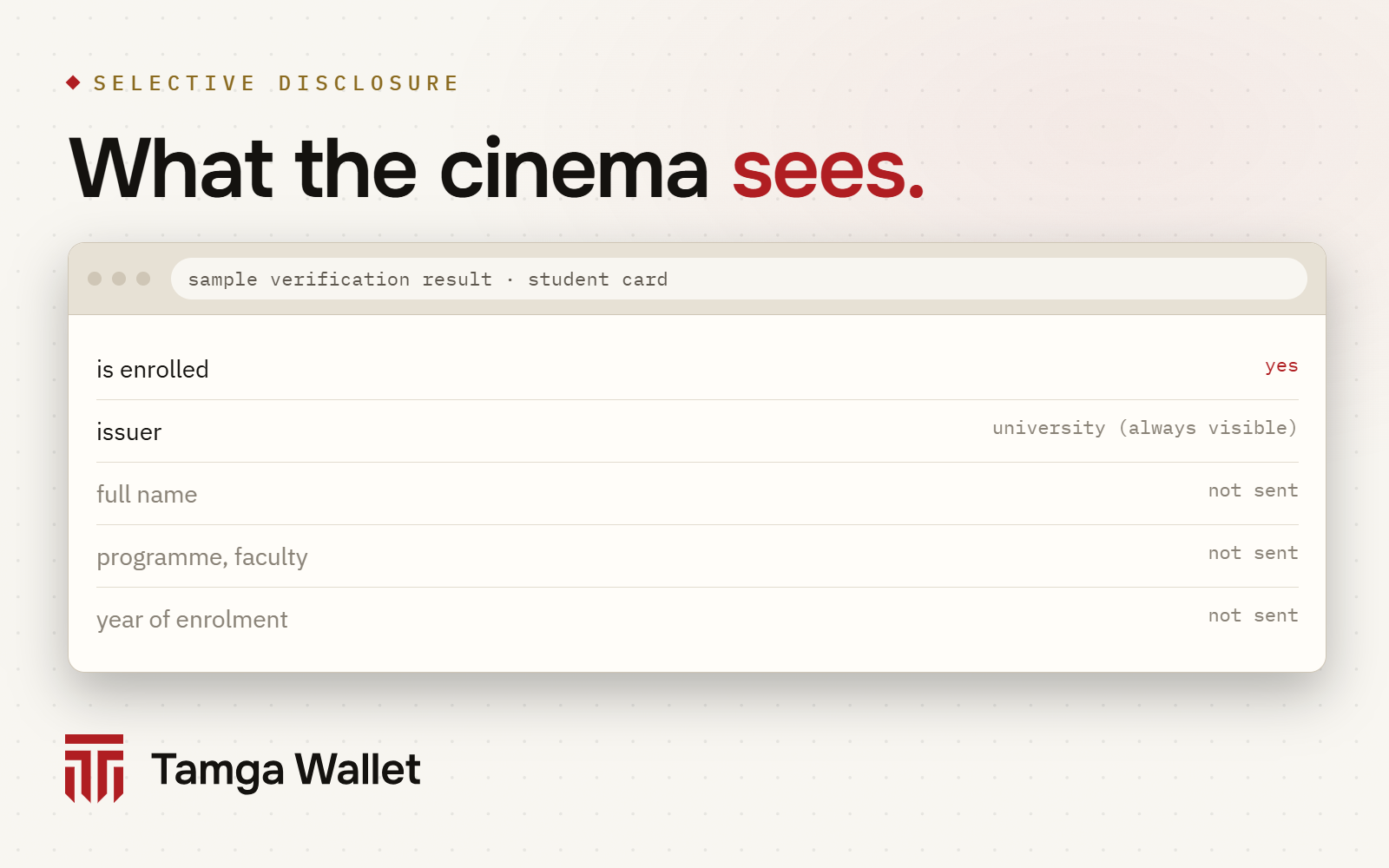
Some things are always visible, though, and it is better to know them:
- Who issued it. The institution's identity travels in the clear; that is how the verifier knows whose signature to check. So the cinema learns "a student at this university", not just "a student".
- What kind of document it is and when it was issued and until when it is valid.
- The public part of the key your phone uses to prove the document is yours. Tamga Wallet uses a separate key for each copy of a document, so this value does not follow you from one verifier to another: Unlinkability.
- A status-list reference for documents that can be revoked.
How does it work without breaking the signature?
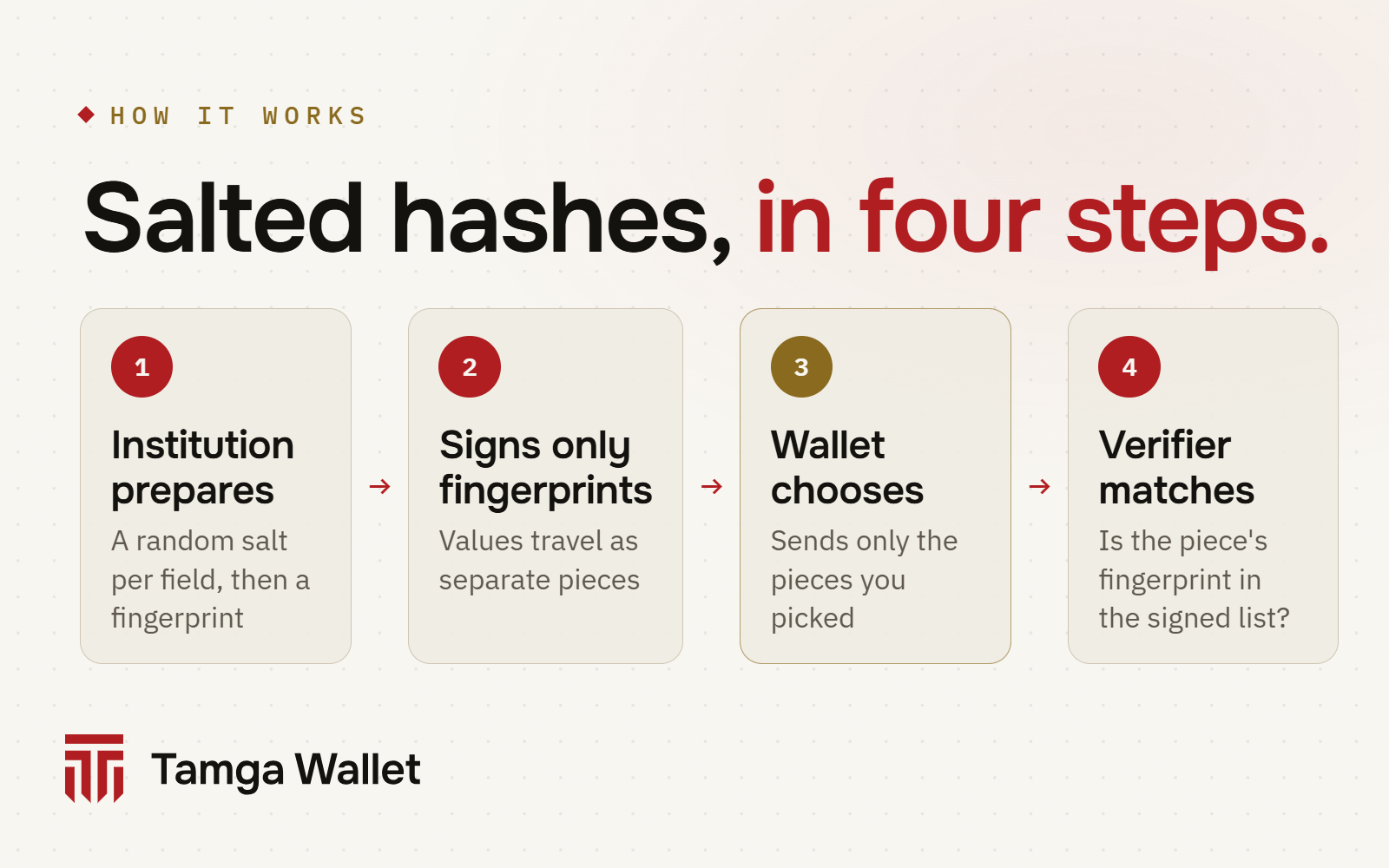
The idea is called salted hashing. The full description is in the SD-JWT standard (RFC 9901), and our SD-JWT VC post goes one level deeper; here is the short version.
- The institution prepares each field separately. For every field that may be hidden, it takes the field name and value, adds a random value of 16 bytes (the salt) and computes a fingerprint (a hash) of the result.
- It signs only the fingerprints. The signed document carries the list of fingerprints, not the values. The values travel next to the document as separate small pieces called disclosures, one per field.
- Your wallet keeps all the pieces. When you approve a share, it sends the signed document plus only the disclosures for the fields you chose. Hiding a field simply means not sending its piece; nothing is re-signed.
- The verifier checks each piece. It computes the fingerprint of every disclosure it received and looks for it in the signed list. If it is there, the institution signed that field. Fields without a disclosure stay as fingerprints the verifier cannot reverse.
The salt is what keeps the hidden fields hidden. Without it, a fingerprint of "is_enrolled: true" or of a birth date would always be the same, and a verifier could guess hidden values by trying the likely ones. With a fresh random salt for every field, guessing does not work.
Here is what one disclosure looks like, decoded. The values are an example, computed the way the network's rules prescribe:
{
  "disclosure": ["in0aF_dIW50H3VA1H6C9sQ", "is_enrolled", true],
  "sent_as": "WyJpbjBhRl9kSVc1MEgzVkExSDZDOXNRIiwgImlzX2Vucm9sbGVkIiwgdHJ1ZV0",
  "fingerprint_in_signed_document": "pUn9E1MBiJdd0gAM8Q72UUVkNbkQnqp3ny78_y3iwI0"
}
The first line is the salt, the field name and the value. The second is the same array encoded for sending. The third is its SHA-256 fingerprint, which is what the institution put inside the signed document. The verifier recomputes the third from the second; if they match, the field is genuine.
Is it the same for in-person checks?
The idea is the same; the packaging differs. For the identity credential, Tamga also uses the ISO mdoc format (ISO/IEC 18013-5), the format of mobile driving licences, which is built for showing a document to a reader in person. There, each data element is stored with its own random value, the institution signs a list of their fingerprints, and the wallet hands over only the elements you approve. An age check can receive age_over_18 and nothing else.
For age there is a further step. A field like "over 18" still comes from a signed document, so the verifier receives a signed yes. With a zero-knowledge proof, Tamga Wallet can prove "over 18" without sending the document at all. Android phones do this today; on iPhone, where the proof is not available yet, only the yes/no field is sent if the website accepts it.
What does this look like in Tamga Wallet?
When a site or a desk asks for a document, the approval screen lists the fields under "These fields will be shared — nothing else leaves". You see who is asking and the registered purpose before you approve with your phone lock.
A few details follow from how selective disclosure works:
- Optional fields. A verifier can mark a field as optional, or ask for one of several options. You can finish without the optional one: Options in a request.
- Fields you don't have. If a verifier asks for something your document doesn't contain, the wallet says so and sends nothing in its place.
- Asking too much. Every verifier is registered with the fields it may ask for. If it asks for more, the wallet shows a separate warning block and holds the share button for a few seconds.
- Staying consistent. For the same verifier and the same document type, the wallet keeps the set of fields consistent. A set that changes from one visit to the next would hint at what is being hidden.
What can't selective disclosure do?
It can only hide fields the institution made hideable, and it can only show answers the institution put in the document. "Is enrolled" works because the university includes it as its own field; the wallet cannot invent a new yes/no answer from your data. And once a field is shared, the verifier has it. Selective disclosure decides what leaves your phone; it has no say over what the verifier does with it afterwards. If you want a verifier to delete what it received, you can ask from History.
Frequently asked questions
Can I hide my name and still show my student card?
Yes, if the verifier only asks for "is enrolled". The name is not sent; the verifier sees the university, the document type, its validity and the one field.
Can the verifier work out the hidden fields?
No. It only has fingerprints made with random salts, which cannot be reversed or guessed.
Who decides which fields can be hidden?
The document type's definition in Tamga Network's schema catalogue. For the student card every content field can be hidden; the issuer, type, dates and key are always visible.
Is selective disclosure part of the EU's wallet rules?
Yes. The EU's digital identity regulation requires wallets to support selective disclosure, and both formats Tamga uses, SD-JWT VC and ISO mdoc, are the formats of the EU's wallet framework.
Sources
- IETF RFC 9901, Selective Disclosure for JSON Web Tokens (SD-JWT): rfc-editor.org
- IETF SD-JWT-based Verifiable Credentials (draft-ietf-oauth-sd-jwt-vc): datatracker.ietf.org
- ISO/IEC 18013-5:2021, Mobile driving licence (mDL) application: iso.org
- Regulation (EU) 2024/1183 (eIDAS 2.0), Article 5a: EUR-Lex
- EU Digital Identity Wallet Architecture and Reference Framework: GitHub
- Tamga Network, SD-JWT VC profile (SPEC-CRED-0002): docs.tamga.network/specifications/sd-jwt-vc
- Tamga Network, Education credentials (SPEC-SCHEMA-0002 §2.3, is_enrolled): docs.tamga.network/specifications/education-schemas
- Tamga Network, Credential formats: docs.tamga.network/concepts/credential-formats
Related
- Article · StandardsSD-JWT VC: the format behind selective disclosureSD-JWT VC is the credential format that lets a wallet send only some fields of a signed document. A short, plain explanation with a simplified example.
- Article · PrivacyShowing the same document twice: why the two can't be linkedTamga Wallet gives each verifier its own copy of a document and each site its own pseudonym, so two places can't match you by comparing notes.
- Article · PrivacyProving your age without showing your date of birthWhen a site only asks "over 18?", Tamga Wallet proves just that answer. Your date of birth, name and the credential itself are not shown.
- Article · PrivacyLiving without oversharing: why 'show everything' must endPhotocopies and screenshots send a whole document when one answer is needed. Data minimisation under GDPR and KVKK, and how selective disclosure helps.
- GuideRequests with options, and missing informationSome websites ask for one of several options or for optional information; you choose what is sent. If they ask for something your credential does not have, nothing is sent.
Step-by-step help is in the Guide
Everything from setup to a lost phone, with the app’s own screens.
Get Tamga Wallet
On the App Store and Google Play. Carry your diploma, student card and tickets on your phone.