Living without oversharing: why 'show everything' must end
Photocopies and screenshots send a whole document when one answer is needed. Data minimisation under GDPR and KVKK, and how selective disclosure helps.
By: Tamga Wallet team7 min read
Oversharing is what happens when a service needs one answer and receives a whole document: a reception desk needs to know who you are and keeps a photocopy of your ID card, a shop needs to know you are a student and receives your student number, department and date of birth. Data protection law already says this should not happen. GDPR and Türkiye's KVKK both require personal data to be limited to what the purpose needs. Selective disclosure makes that rule practical: the wallet sends only the field that was asked for, after you have seen the request and approved it.
What does oversharing look like in everyday life?
Most of it is so familiar that it no longer feels like sharing:
- a photocopy of your ID card left at a reception desk;
- a scan of your passport or diploma sent as an email attachment;
- a screenshot of your student card sent to get a discount;
- a full transcript sent when the only question was "did you graduate?".
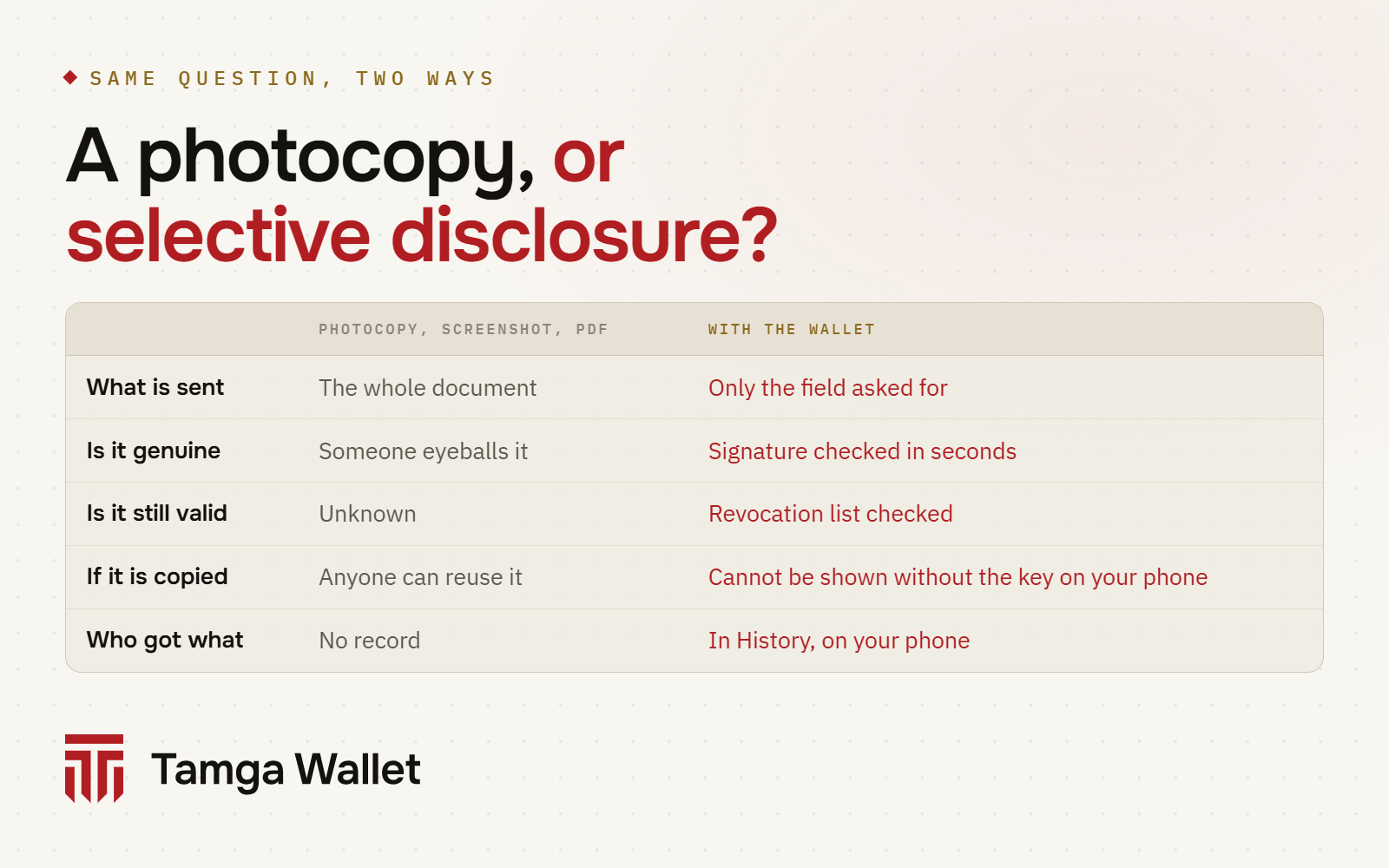
In each case the other side wanted one fact. It received every field on the document, plus a copy it can keep, forward and store for as long as it likes. And it still cannot check whether the copy is genuine or whether the document is still valid.
What do GDPR and KVKK say about it?
Both laws have the same principle, under different names.
GDPR, Article 5(1)(c), calls it data minimisation: personal data must be "adequate, relevant and limited to what is necessary in relation to the purposes for which they are processed". Article 25 adds data protection by design and by default: the controller must build systems so that, by default, only the personal data needed for each specific purpose is processed.
KVKK (Law No. 6698 on the Protection of Personal Data), Article 4(2)(ç), says personal data must be "connected to, limited to and proportionate to" the purpose for which it is processed (in Turkish, işlendikleri amaçla bağlantılı, sınırlı ve ölçülü olma). Article 10 obliges the controller to tell you, when it collects your data, who it is and for what purpose it processes it. Article 11 gives you the right to ask whether your data is processed and to request its correction or erasure.
The EU's digital identity regulation builds the same principle into wallets. Its recital 59 says the wallet should technically enable selective disclosure of attributes, and Article 5a(4)(a) requires that selective disclosure be possible when a user presents data. For very large online platforms, Article 5f(3) limits wallet-based sign-in to the minimum data necessary for the service.
Why is a copy of a document a risk?
A copy outlives its purpose. The desk needed your identity for one visit, but the photocopy stays in a folder. An email attachment stays in several inboxes and backups. None of these copies expires, and none of them is tied to you: anyone who gets hold of the scan can present it as if they were you.
Copies are also what leaks. KVKK Article 12(5) says that when personal data is obtained by others unlawfully, the controller must notify the person concerned and the Board as soon as possible, and the Board may announce it on its website. The Personal Data Protection Authority does publish such data breach announcements. Every unnecessary copy is one more place where your data can end up in one.
How does selective disclosure change this?
With a digital identity wallet, the document is not a picture. It is a record signed by the institution, built so that each field can be shared or left out on its own. When a site asks for one field, only that field is sent, and the site can still check the institution's signature on it.
Take a student discount. The site asks "is this person a student?". Tamga Wallet sends that answer; your name, student number, department and date of birth stay on your phone:
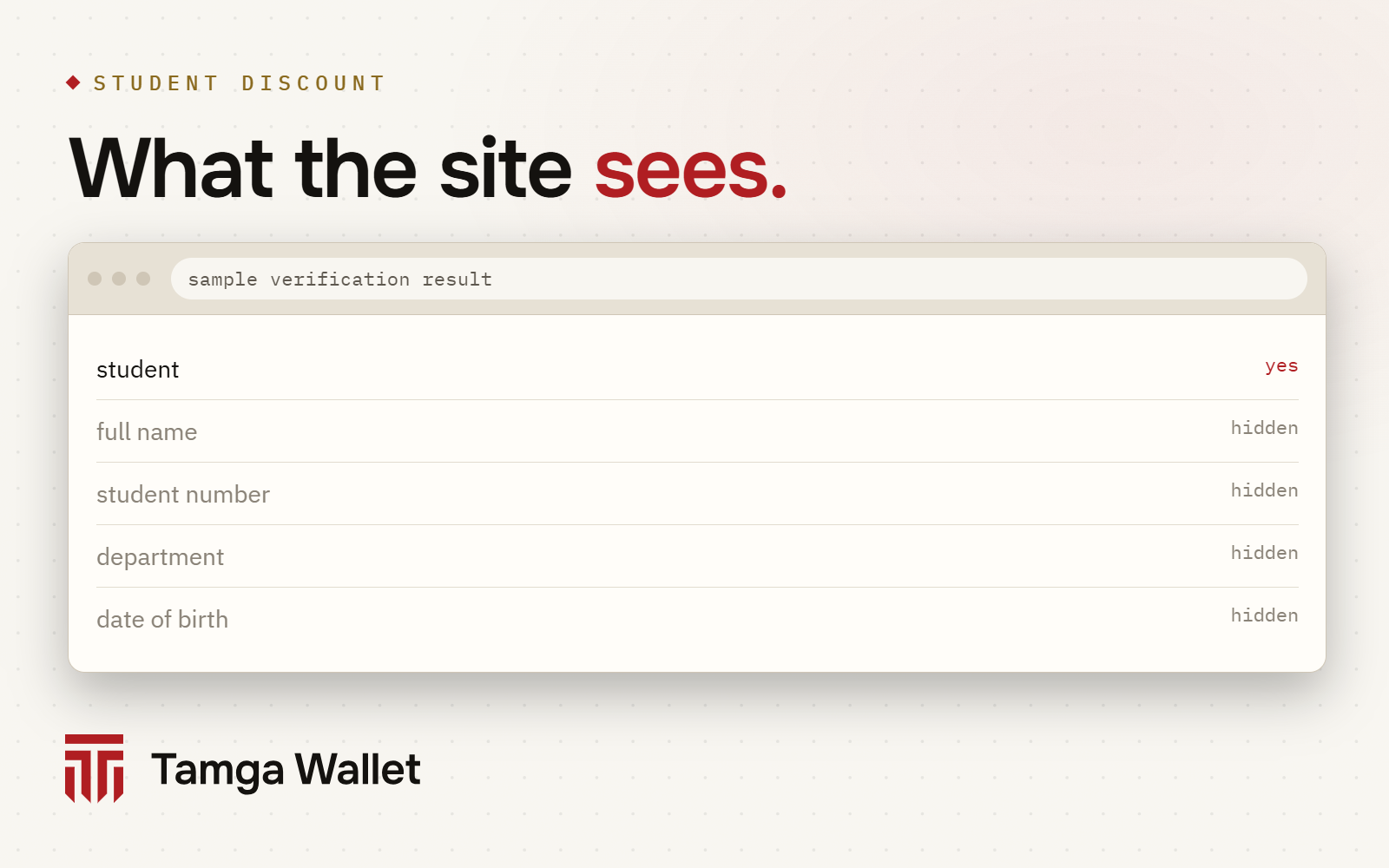
Age works the same way, with an extra step. If a site asks only "over 18?", Tamga Wallet proves that answer with a zero-knowledge proof: neither the date of birth nor the credential itself is shown. Where the phone cannot create the proof yet (iPhone, for now), the wallet sends only the yes/no field, if the site accepts it: Proving your age without showing your date of birth.
Side by side, the difference looks like this:
What does the approval screen add?
Selective disclosure decides what can be sent. The approval screen makes sure you decide what is sent.
When a site, a desk or a door asks for a document, Tamga Wallet first shows you who is asking, which fields and for what purpose. Nothing leaves the phone until you tap Share and confirm with your phone's own lock. Some requests leave room for choice: a site may accept one of several documents, or mark some fields as optional, and you pick what goes. If a site asks for something your document does not contain, nothing is sent: Request options.
Verifiers register a purpose with Tamga Network, and the trust list records which fields that purpose covers. If a site is not on the list, or asks for more than its registered purpose allows, the wallet shows a red warning and holds the Share button for a few seconds, so the request does not slip past you: Unregistered verifier.
What else keeps a sharing small?
Data minimisation is not only about fields. A few other things in Tamga Wallet keep each sharing from becoming a trail:
- A separate copy for each verifier. The same verifier always gets the same copy, different verifiers different copies, so they cannot match you by comparing what they received.
- A separate pseudonym for each site. "Sign in with Tamga" does not send your ID number; each site knows you by its own pseudonym.
- No issuer in the loop. Verifiers check revocation against lists downloaded in advance, so the institution that issued your document does not learn where you showed it.
- No screenshots. Document, QR, approval and PIN screens block screenshots and screen recording, so the wallet does not become a new source of the photocopies it replaces: Screenshot protection.
- Your record, on your phone. History lists what you shared, with whom and when. It stays on the phone: Activity history.
What the wallet cannot do for you
Selective disclosure limits what leaves your phone. It does not control what happens after:
- an organisation keeps what you approved under its own rules, and the wallet cannot delete it. From History you can send it a "delete my data" request or report a suspicious request to the data protection authority: Ask to delete;
- some services are required by law to identify you fully, and then a full identity is the minimum. The approval screen still shows you what is asked;
- a wallet only helps where the other side accepts it. Until then, a photocopy may still be the only option. You can still ask, as KVKK Article 10 entitles you, what the copy is for and how long it will be kept.
Frequently asked questions
What is data minimisation?
It is the principle that personal data must be limited to what is necessary for the purpose. GDPR Article 5(1)(c) states it directly; KVKK Article 4(2)(ç) requires data to be connected to, limited to and proportionate to the purpose.
What is selective disclosure?
Sharing only the fields that were asked for from a signed document, while the verifier can still check the institution's signature. The other fields stay on your phone.
Can a site see fields I did not approve?
No. Only the fields you saw and approved on the approval screen are sent. The verifier cannot open the hidden fields.
Is a screenshot of my ID card a safe way to prove my age?
It shares far more than your age: your name, ID number, photo and date of birth, in a form anyone can reuse. A wallet can prove "over 18" without any of that.
Does the wallet stop organisations from keeping my data?
No. It limits what is sent. What an organisation keeps afterwards is governed by its own rules and the law; the wallet helps you ask for deletion.
Sources
- Regulation (EU) 2016/679 (GDPR), Articles 5 and 25, EUR-Lex
- Law No. 6698 on the Protection of Personal Data (KVKK), Articles 4, 10, 11, 12 (in Turkish)
- Personal Data Protection Authority: data breach notifications (in Turkish)
- Regulation (EU) 2024/1183 (eIDAS 2.0), recital 59, Articles 5a and 5f, EUR-Lex
- How it works · Security · Privacy policy
Related
- Article · ConceptsSelective disclosure: showing just one line of a documentSelective disclosure lets you show one field of a signed document, such as "is a student", while the rest stays hidden and the signature still checks out.
- Article · PrivacyProving your age without showing your date of birthWhen a site only asks "over 18?", Tamga Wallet proves just that answer. Your date of birth, name and the credential itself are not shown.
- Article · PrivacyShowing the same document twice: why the two can't be linkedTamga Wallet gives each verifier its own copy of a document and each site its own pseudonym, so two places can't match you by comparing notes.
- GuideRequests with options, and missing informationSome websites ask for one of several options or for optional information; you choose what is sent. If they ask for something your credential does not have, nothing is sent.
- GuideAsk an organisation to delete your data, or report itYou can ask an organisation you showed information to to delete your data, or report a suspicious request to the data protection authority. The wallet prepares the text; you send it.
Step-by-step help is in the Guide
Everything from setup to a lost phone, with the app’s own screens.
Get Tamga Wallet
On the App Store and Google Play. Carry your diploma, student card and tickets on your phone.