What is a verified document, and why is it hard to fake?
A verified document carries the institution's signature, is checked against a signed trust list and revocation list, and works only with your phone's key.
By: Tamga Wallet team8 min read
A verified document is a document that a computer can check on its own: it carries the issuing institution's digital signature, the institution can be looked up on a signed trust list, and a published revocation list says whether it is still valid. Changing a single letter breaks the signature, a made-up institution is not on the list, and the document only works together with a key that never leaves your phone. That is why it is so much harder to fake than a PDF, a photocopy or a screenshot.
Below, each of those checks in plain words, and where each one stops.
What is wrong with a PDF or a screenshot?
A PDF diploma or a photo of a student card looks official, but nothing in it can be checked by a machine. Whoever receives it has three questions and no good way to answer them:
- Did it really come from this institution? A logo can be copied.
- Has anything been changed? A date or a grade can be edited in minutes.
- Is it still valid? A student who left last term still has last term's card.
Today the usual answer is a phone call or an email to the institution, which is slow and does not scale. A verified document answers all three questions in seconds, without contacting the institution.
What is a digital signature, in plain words?
A digital signature is a short piece of data that only the holder of a particular secret key can produce, and that anyone can check with the matching public key. The institution keeps the secret key; the public key is published.
When the university issues your diploma, its software computes a fingerprint of the content and signs that fingerprint. A verifier recomputes the fingerprint from the document it receives and checks the signature. If even one character of the document changed, the fingerprint is different and the signature no longer matches. Tamga Network uses the same algorithm EU wallets use for this (ECDSA on the P-256 curve with SHA-256, known as ES256).
There is a small twist that makes selective disclosure possible. Each field of the document (name, degree, graduation date, grade) is fingerprinted separately with a random value mixed in, and the institution signs the list of those fingerprints. When you share only "degree", the verifier receives that one field and can check that its fingerprint is on the signed list. The other fields stay hidden; the verifier sees only their fingerprints, which reveal nothing. The format behind this is SD-JWT, published by the IETF as RFC 9901 (SD-JWT VC explained); the ISO mdoc format (ISO/IEC 18013-5) works on the same idea.
Whose key is it, and how do you know?
A signature proves that a key signed the document. It does not prove that the key belongs to a real university. That is what the trust list is for.
Every institution on Tamga Network has a certificate that binds its signing key to its identity. The certificate is itself signed, and the chain goes up to a root key. The chain looks like this:
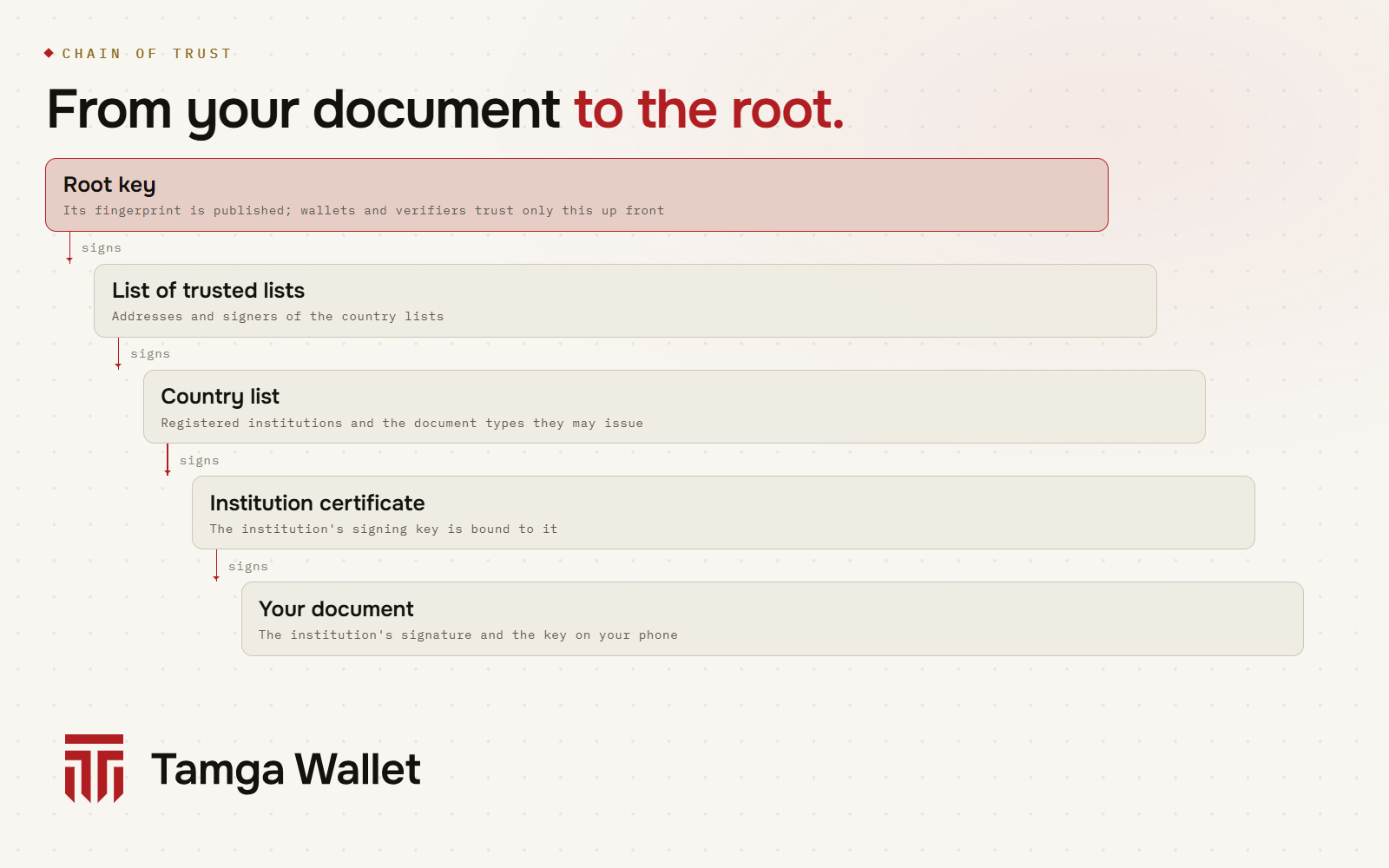
- Root key. Wallets and verifiers trust exactly one thing up front: the fingerprint of the root key, which is published.
- List of trusted lists. Signed by the root; it points to each country's list and names who may sign it. The EU uses the same two-level model.
- Country list. Names the registered institutions, the document types each one may issue, the registered verifiers and the recognised wallet providers.
- Institution certificate. Links the institution's signing key to its entry in the list.
- Your document. Signed with that key.
One detail matters here. A document says which institution issued it, but the verifier does not take the document's word for it. The institution's identity is derived from its certificate, so a forger cannot write "Issued by University X" into a document and hope it sticks.
Being on the list is also not a blank cheque. Each institution is authorised for specific document types, and this check cannot be switched off. A registered ticket seller cannot issue a diploma that any verifier would accept. Registration in the network records an institution; the legal right to issue a diploma comes from outside the network, from the law that governs that institution.
Why can't someone just copy my verified document?
Because a copy is not enough to show it. Every document is bound to a key that your phone creates in its key store (Secure Enclave on iPhone, Keystore on Android). The key cannot be exported; it does not go into backups or the transfer file.
When you share a document, the wallet signs the presentation with that key. The signature includes a one-time value chosen by the verifier and the verifier's own identity. So:
- someone who copies the document file has no key and cannot produce the signature;
- someone who intercepts a presentation cannot replay it to another site, because it names the original verifier, and cannot replay it later, because the one-time value is used once.
The network's rules go one step further: documents are not issued to wallets whose keys are kept in software. Institutions check a wallet attestation before they issue. For the live service, Tamga Wallet's wallet provider gives that attestation only to phones whose keys are confirmed to be in secure hardware by the phone's own attestation (App Attest on iPhone, key attestation on Android). A modified app that keeps its keys in software does not get one.
How does a verifier know a document has not been revoked?
Each institution publishes a revocation list. The format is the IETF Token Status List: a long, signed row of bits in which every document has one position. The bit says "valid", "revoked" or "suspended". The list's address reveals nothing about the institution's students or years.
Verifiers download these lists in advance, at regular intervals, and keep them in a cache. At the moment of a check, nobody is asked anything. This is good for privacy: the institution cannot learn where or when its documents are shown.
Your wallet uses the same lists. When online, it checks your own documents and shows a status badge with the time of the last check: Credential status. Short-lived documents, such as a student certificate with a short validity, have no revocation list; their short lifetime does that job instead. More on this in What happens on your phone when a document is revoked?
What are the possible results of a check?
A verifier on Tamga Network runs the checks in a fixed order: format and signature, document type, trust (is the institution listed and authorised for this type), revocation, and finally the verifier's own policy (were all requested fields disclosed, is the request within its registered purpose). The result is one of three:
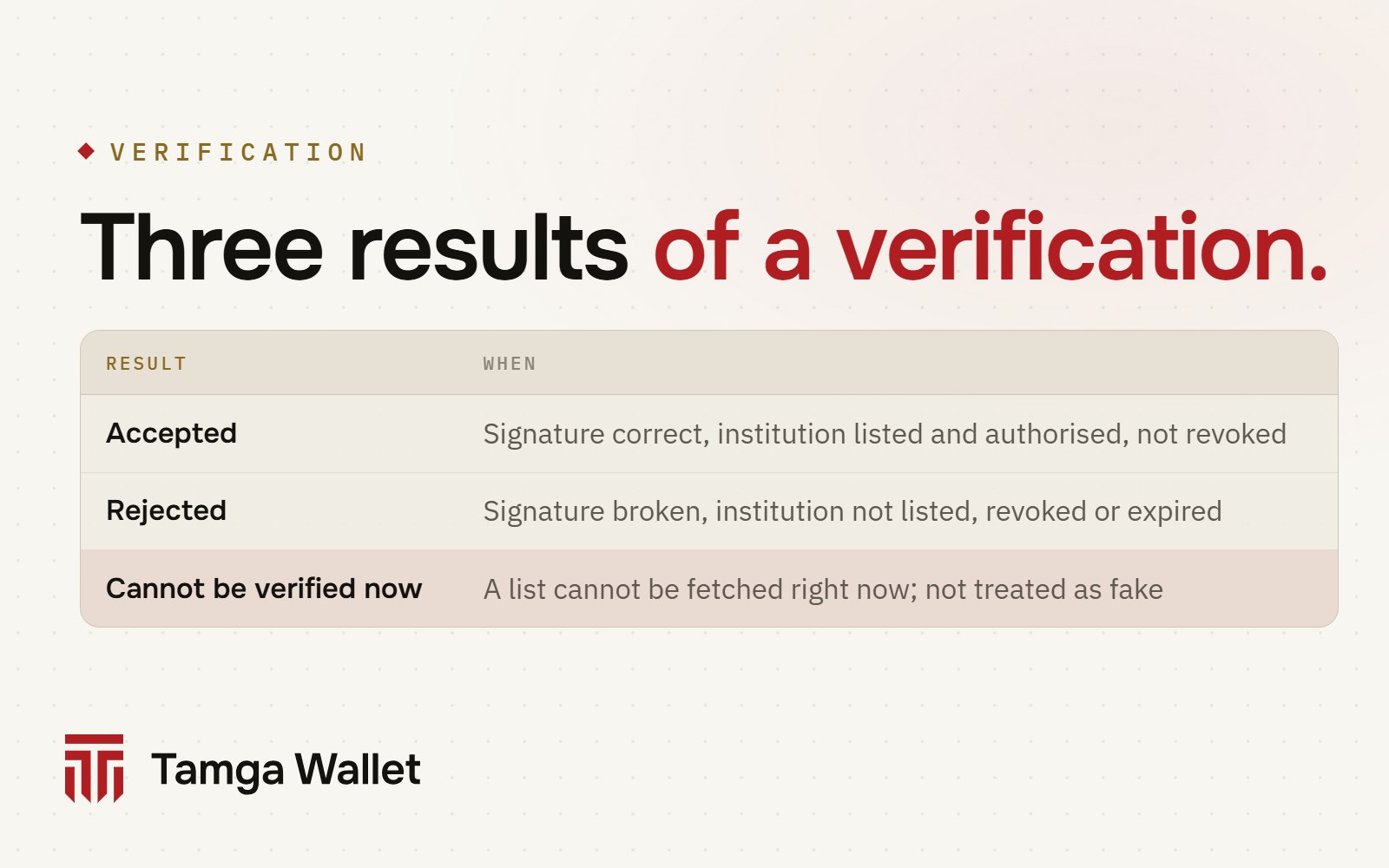
The third result matters. If a revocation list or the trust list cannot be fetched and the cached copy is too old, the result is "cannot be verified now", not "rejected". The network's rules forbid treating it as a rejection. The difference between "this diploma is fake" and "I cannot check right now" can decide whether someone gets a job.
What are the limits?
No system is unbreakable, and it is better to say where the edges are:
- Your unlocked phone. Someone who knows your phone's unlock and holds your phone can show your documents. If your phone is lost, close your wallet with your revocation code: I lost my phone.
- A stolen institution key. If an institution's key is compromised, its certificate is revoked, and verifiers check certificate revocation as part of the signature step. Documents signed under a revoked certificate stop passing.
- Wrong data at the source. A signature proves the institution issued the document; it does not prove the institution's own record was correct. If the register is wrong, the document is wrong too, and the institution fixes it.
- No independent review yet. Tamga Wallet has not yet had an independent security review. If you find a vulnerability, please report it: Security.
Frequently asked questions
Can a verified document be edited?
It can be edited, but the edit is detected. Changing any field changes its fingerprint, and the institution's signature no longer matches. The verifier rejects it.
Does the verifier need to call the institution?
No. It checks the signature with the institution's published key, finds the institution on the trust list, and reads the revocation list it already downloaded.
What if I am offline?
You can still show a document. Your wallet marks a document "Not verified" if its last revocation check is more than 24 hours old, and checks again once you are online. The verifier needs its own fresh lists to decide.
Is a screenshot of my document in the wallet a valid copy?
No. A screenshot is a picture, not a signed document, and it cannot produce the signature from your phone's key. The app also blocks screenshots on document and approval screens.
Who decides which institutions are on the trust list?
The registration authority of Tamga Network records institutions and their permitted document types. Today it does this provisionally for Türkiye; the design lets a state publish its own list later without changing documents or wallets.
Sources
Related
- Article · StandardsSD-JWT VC: the format behind selective disclosureSD-JWT VC is the credential format that lets a wallet send only some fields of a signed document. A short, plain explanation with a simplified example.
- Article · ConceptsWhat happens on your phone when a document is revoked?Institutions publish document status in a signed list. Your wallet checks it by itself, and the issuer never learns where you showed a document.
- Article · ConceptsSelective disclosure: showing just one line of a documentSelective disclosure lets you show one field of a signed document, such as "is a student", while the rest stays hidden and the signature still checks out.
- GuideCredential status: valid, revoked, suspended, not verifiedWhen online, the wallet itself checks whether the institution has revoked a credential; the badge shows the result and when it was last checked.
- GuideUnregistered verifier and excessive request warningsIf the requester is not in the Tamga trusted list, or asks for more than its registered permission, the wallet shows a red warning; you do not have to share.
Step-by-step help is in the Guide
Everything from setup to a lost phone, with the app’s own screens.
Get Tamga Wallet
On the App Store and Google Play. Carry your diploma, student card and tickets on your phone.