SD-JWT VC: the format behind selective disclosure
SD-JWT VC is the credential format that lets a wallet send only some fields of a signed document. A short, plain explanation with a simplified example.
By: Tamga Wallet team4 min read
SD-JWT VC is the format every Tamga document uses. It is a signed JSON document in which every field can be hidden or revealed on its own: the institution signs the whole document once, and when you show it, your wallet sends only the fields you approved, while the signature still checks out. This is what makes selective disclosure possible.
The name has two parts. SD-JWT (Selective Disclosure for JSON Web Tokens) is the mechanism, published by the IETF as RFC 9901 in November 2025. SD-JWT VC (SD-JWT-based Verifiable Digital Credentials) is the profile that turns it into a credential with a type, an issuer and a holder key; it is an IETF draft (version 19, August 2026) that has gone to the IESG for publication.
How can a signature stay valid when fields are missing?
The trick is that the institution never signs the field values directly. For every field, it builds a small array of a random salt, the field name and the value, encodes it, and hashes it. The signed document carries only these hashes, in a list called _sd. The encoded arrays, called disclosures, are handed to your wallet next to the signed part.
When you show the document, the wallet attaches the disclosures for the fields you approved and leaves out the rest. The verifier hashes each disclosure it received and finds the result in the _sd list. A field that was not sent stays a hash, and thanks to the random salt nobody can guess what is behind it, even for a short value such as a birth date.
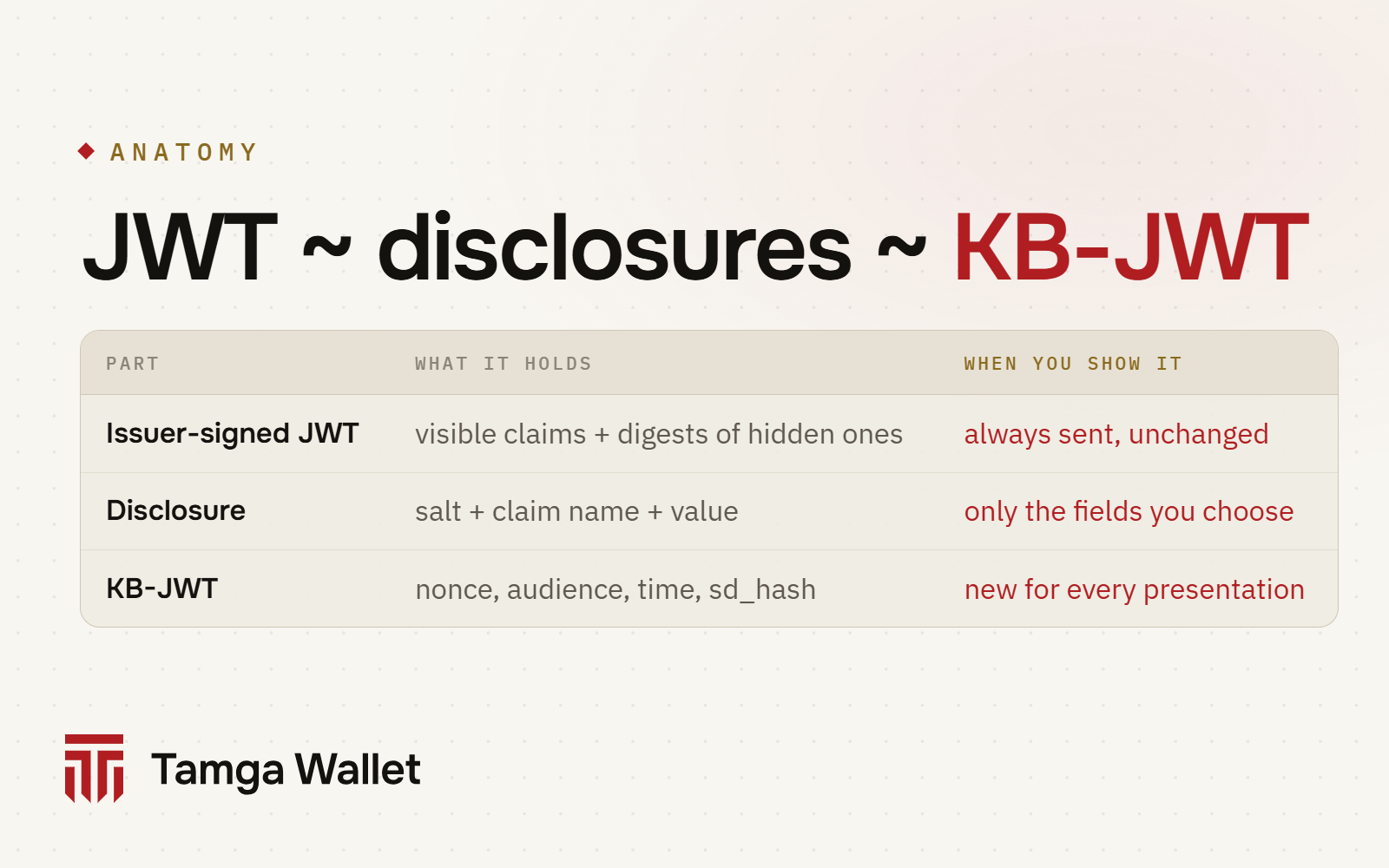
On the wire, the parts are joined with a tilde: <signed JWT>~<disclosure>~<disclosure>~<KB-JWT>. Hiding a field means removing its disclosure from the string. Nothing is added and the signed part does not change.
What does it look like?
Here is the signed part of a student certificate after decoding:
{
  "iss": "https://issuer.example.edu",
  "vct": "urn:tamga:edu:StudentCredential:1",
  "iat": 1791417600,
  "exp": 1803772800,
  "_sd_alg": "sha-256",
  "_sd": [
    "2l60GCkDykrIj0RNY7DFIWRL6ku9DweCmBUpcHSSDGc",
    "Ah9zbMv904G2xsaDrXkT7qj_7b00R0h7fgJeumqk7cA",
    "F7SV1UscA8u8blXRZwlwhqT_AE2mByqMexF2hFCLKLA"
  ],
  "cnf": {
    "jwk": { "kty": "EC", "crv": "P-256", "x": "…", "y": "…" }
  }
}
Only the fields needed to check the document are in the clear: who issued it (iss), its type (vct), when it was issued and when it expires, and the public part of your phone's key (cnf). Your name, programme and enrolment status are among the three hashes.
And here is one disclosure, the one a student-discount check would ask for:
WyJxVjNfdUZ0Ml9IZVA5a1J4Wm1XN0JBIiwgImlzX2Vucm9sbGVkIiwgdHJ1ZV0

→ ["qV3_uFt2_HeP9kRxZmW7BA", "is_enrolled", true]

SHA-256 of the encoded string, base64url:
2l60GCkDykrIj0RNY7DFIWRL6ku9DweCmBUpcHSSDGc   ← first entry in _sd
A website that asks "are you a student?" receives the signed part, this one disclosure and a fresh device signature. It learns is_enrolled: true and which institution says so. Your name and programme stay hashes it cannot read.
What stops someone from replaying your document?
The last part of the string is the KB-JWT (key binding JWT). Your wallet creates it for every presentation and signs it with the key in your phone's secure hardware, the key whose public half is in cnf. It contains the verifier's one-time nonce, the verifier's identifier, the time, and sd_hash, a hash of exactly the parts being presented.
A copied presentation fails at a second verifier because the audience and nonce don't match. A middleman who removes a disclosure breaks sd_hash. And without the phone's key, nobody can produce a new KB-JWT (why a copied document is useless). The standard leaves key binding optional; in Tamga it is mandatory for every document.
What does Tamga add on top of the standard?
The standard leaves options open. Tamga's profile closes them:
| Topic | Tamga rule |
|---|---|
| Signature | ES256 (P-256) only |
| Hash | sha-256 only |
typ header | dc+sd-jwt; the older vc+sd-jwt is rejected |
| Salt | 128 bits, new for every disclosure |
| Hidden fields | the institution hides every field that is allowed to be hidden |
| Key binding | mandatory, no exceptions |
| Decoy hashes | not used |
Tamga's identity credential is also issued in a second format, ISO mdoc, for in-person checks and browsers that accept only mdoc: ISO 18013-5 and mdoc. How documents travel between institution, wallet and verifier: OpenID4VCI and OpenID4VP.
Go deeper
The full byte-level profile, with worked examples, the verification algorithm and the common implementation mistakes, is in the Tamga Network developer docs: SD-JWT VC profile (SPEC-CRED-0002). The format choice is explained on Credential formats.
Frequently asked questions
Is SD-JWT VC the same as a JWT?
It builds on one. The signed part is an ordinary JWT; what SD-JWT adds is the salted hashes, the disclosures next to the JWT and the key binding signature at the end.
Can a verifier see how many fields I hid?
It sees the number of hashes in _sd, so it can tell that hidden fields exist. It cannot read them. The field list of each document type is public in the schema catalogue anyway.
Which Tamga documents use SD-JWT VC?
All of them: student certificates, diplomas, tickets, identity, driving licence information, and email and phone credentials. The identity credential is issued as mdoc as well.
Sources
Related
- Article · ConceptsSelective disclosure: showing just one line of a documentSelective disclosure lets you show one field of a signed document, such as "is a student", while the rest stays hidden and the signature still checks out.
- Article · ConceptsWhat is a verified document, and why is it hard to fake?A verified document carries the institution's signature, is checked against a signed trust list and revocation list, and works only with your phone's key.
- Article · StandardsOpenID4VCI, OpenID4VP and HAIP: how wallets move documentsOpenID4VCI brings a document from an institution into your wallet, OpenID4VP takes it to a verifier, and HAIP fixes the options the EU relies on.
- Article · StandardsISO 18013-5 and mdoc: showing a document face to faceISO/IEC 18013-5 defines mdoc: the format and protocol for showing a document from your phone to a reader in person, over Bluetooth, offline.
- GuideShow a credential on a websiteThe website shows a QR code; you scan it with Scan, see who is asking for what and why, and approve only those fields.
Step-by-step help is in the Guide
Everything from setup to a lost phone, with the app’s own screens.
Get Tamga Wallet
On the App Store and Google Play. Carry your diploma, student card and tickets on your phone.