OpenID4VCI, OpenID4VP and HAIP: how wallets move documents
OpenID4VCI brings a document from an institution into your wallet, OpenID4VP takes it to a verifier, and HAIP fixes the options the EU relies on.
By: Tamga Wallet team5 min read
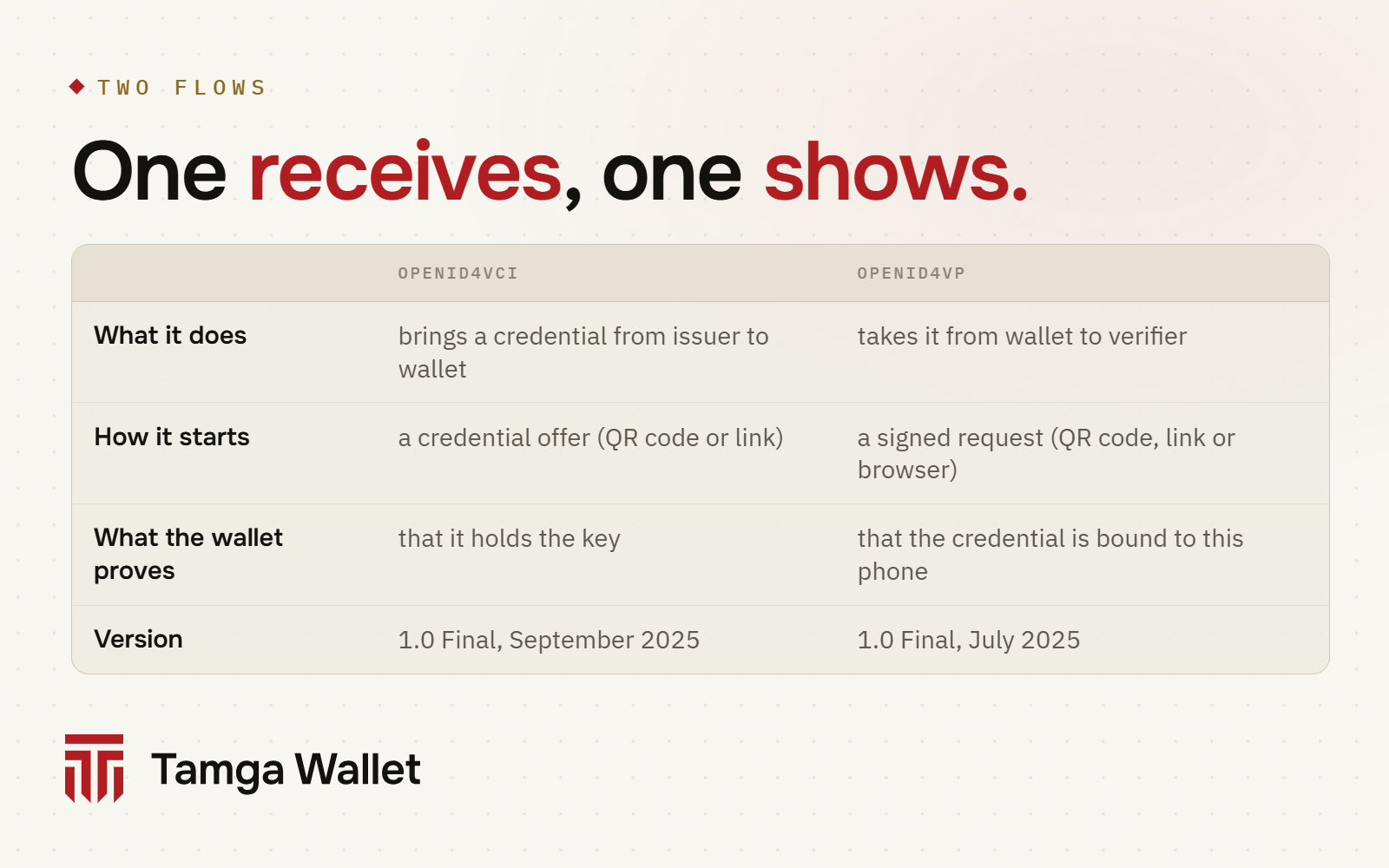
Two OpenID Foundation standards carry documents in and out of a wallet. OpenID4VCI (OpenID for Verifiable Credential Issuance) is how an institution issues a document into your wallet. OpenID4VP (OpenID for Verifiable Presentations) is how a website or a desk asks your wallet for a document and gets back only the fields you approved. HAIP (the High Assurance Interoperability Profile) narrows both down to one set of choices for high-security use, and the EU's digital identity ecosystem builds on it. Tamga Wallet uses all three.
How does a document get into your wallet (OpenID4VCI)?
OpenID4VCI 1.0 became a Final specification on 16 September 2025. In Tamga, issuance starts one of two ways.
The institution makes an offer. It shows you a QR code or sends a link, and separately a 6-digit one-time code.
- You scan the QR code with Scan. It contains only a short address of the credential offer, not the offer itself, so the QR stays small.
- The wallet fetches the offer. It names the institution and the document type, and carries a pre-authorized code. In Tamga an offer can be used once and expires after five minutes.
- The wallet reads the institution's public metadata and checks that the institution is in Tamga Network's trust list. If it isn't, the wallet refuses.
- You type the 6-digit code. The wallet exchanges the pre-authorized code and your code for a short-lived access token. The code is delivered separately from the QR code, so someone who photographs the QR code over your shoulder still can't take your document.
- The wallet gets a fresh
nonce, signs it with new keys created in your phone's secure hardware, and sends the signatures together with attestations that it is a genuine wallet on secure hardware. - The institution checks all of this and issues the document as 10 copies, each bound to a different key, so that different verifiers can't link you.
You ask from the wallet. You find the institution in the in-app list and request the document. Instead of a code, you present your identity credential, and the institution matches it against its own records. That is the standard's authorization code flow.
openid-credential-offer://?credential_offer_uri=https%3A%2F%2Fissuer.example.edu%2Foffer%2F8a3f9c21

GET /offer/8a3f9c21 HTTP/1.1
Host: issuer.example.edu

HTTP/1.1 200 OK
Content-Type: application/json

{
  "credential_issuer": "https://issuer.example.edu",
  "credential_configuration_ids": ["StudentCredential"],
  "grants": {
    "urn:ietf:params:oauth:grant-type:pre-authorized_code": {
      "pre-authorized_code": "oaKazRN8I0IbtZ0C7JuMn5",
      "tx_code": { "input_mode": "numeric", "length": 6 }
    }
  }
}
Guides: Get a credential with the institution's QR code and Request a credential from the institution list.
How does a website ask for a document (OpenID4VP)?
OpenID4VP 1.0 became Final on 9 July 2025.
- The verifier makes a signed request. It names what it wants with a DCQL query (Digital Credentials Query Language): which document type, which fields. It identifies itself with
x509_hash, a fingerprint of its access certificate. - The request reaches your wallet through a QR code, a link or, on the same phone, the website's button.
- The wallet checks the verifier. It verifies the signature and looks up the fingerprint in Tamga Network's trust list. A verifier that isn't listed gets an "unregistered verifier" warning. A listed one that asks for a field outside its registered purpose gets an over-asking warning, and the Share button waits a few seconds.
- You approve on the approval screen with your phone's lock. The screen shows who is asking, why, and every field.
- The wallet sends an encrypted response. Only the approved fields, with a device signature bound to that verifier and that request (the KB-JWT in SD-JWT VC), encrypted to the verifier's key (
direct_post.jwt). - The verifier checks the signatures, the issuer in the trust list, the binding to your phone, the validity period and the revocation status, and gets one of three results: accepted, rejected, or cannot be verified right now.
The same flow can carry the mdoc version of a document. Guide: Show a document on a website.
What is HAIP, and why does the EU use it?
Both standards leave many choices open: which formats, which signature algorithms, how a verifier proves who it is, whether responses are encrypted. Two products can each follow the standard and still not work together. HAIP 1.0 (OpenID4VC High Assurance Interoperability Profile, Final, December 2025) makes those choices for use cases that need "a high level of security and privacy", in its own words. In short:
| Topic | HAIP choice |
|---|---|
| Formats | SD-JWT VC (dc+sd-jwt) and ISO mdoc (mso_mdoc) |
| Signatures | ES256 (P-256) supported by everyone |
| Query language | DCQL |
| Verifier identity | signed requests with the x509_hash client identifier |
| Responses | encrypted (direct_post.jwt, and dc_api.jwt in the browser) |
| Wallet trust | wallet attestation and key attestation at issuance |
| Revocation | Token Status List |
HAIP names eIDAS 2.0 and the European digital identity ecosystem among its targets, and Tamga Network's rules follow HAIP 1.0 as the EU profile. Two of its rules show up directly in Tamga Wallet: it accepts only x509_hash verifiers, and the "who" field of its wallet attestation is the same on every phone, so it carries no phone-specific value.
What works today?
Issuance by offer and from the institution list, and presentation by QR code or link, work in Tamga Wallet today. The browser channel (the W3C Digital Credentials API, where the browser opens the wallet) is ready on the verifier side; the wallet connection is not there yet.
Go deeper
The Tamga Network developer docs have the full profiles: Issuance and OpenID4VCI profile (SPEC-PROTO-0001); Presentation and OpenID4VP profile (SPEC-PROTO-0002); the two HAIP rules in ADR-0034.
Frequently asked questions
Do I need to know these protocols to use the wallet?
No. You scan a QR code, read the approval screen and approve. The protocols run underneath and decide what the wallet checks for you.
Why does the institution ask for a separate code?
So that someone who sees or photographs the QR code can't collect your document. In Tamga the code is mandatory for offers like this and is delivered separately from the QR code; three wrong tries cancel the offer.
Is HAIP a law?
No. It is an OpenID Foundation specification. The EU's digital identity ecosystem relies on it to make wallets, issuers and verifiers from different makers work together.
Sources
- OpenID for Verifiable Credential Issuance 1.0 (Final, 16 September 2025)
- OpenID for Verifiable Presentations 1.0 (Final, 9 July 2025)
- OpenID4VC High Assurance Interoperability Profile 1.0 (Final, December 2025)
- OpenID4VCI profile (SPEC-PROTO-0001), Tamga Network docs
- OpenID4VP profile (SPEC-PROTO-0002), Tamga Network docs
- ADR-0034: HAIP client identifier and wallet attestation subject, Tamga Network docs
Related
- Article · StandardsSD-JWT VC: the format behind selective disclosureSD-JWT VC is the credential format that lets a wallet send only some fields of a signed document. A short, plain explanation with a simplified example.
- Article · StandardsISO 18013-5 and mdoc: showing a document face to faceISO/IEC 18013-5 defines mdoc: the format and protocol for showing a document from your phone to a reader in person, over Bluetooth, offline.
- Article · PrivacyShowing the same document twice: why the two can't be linkedTamga Wallet gives each verifier its own copy of a document and each site its own pseudonym, so two places can't match you by comparing notes.
- GuideGet a credential with the institution's QR codeThe institution shows you a QR code and a 6-digit one-time code on a screen or in an email; you scan the QR code with Scan and enter the code.
- GuideShow a credential on a websiteThe website shows a QR code; you scan it with Scan, see who is asking for what and why, and approve only those fields.
Step-by-step help is in the Guide
Everything from setup to a lost phone, with the app’s own screens.
Get Tamga Wallet
On the App Store and Google Play. Carry your diploma, student card and tickets on your phone.