Showing a document to a person, phone to phone
Tamga Wallet lets two people check a document face to face, from one phone to another, without a server and without the ID number ever leaving.
Tamga Wallet team 8 min read
Tamga Wallet can show a document to another person, not only to an organisation. Two people stand side by side: one opens Show to a person, the other opens Check a person's credential and scans a code. The document goes from one phone to the other over Bluetooth, the checking phone verifies it on the spot, and it keeps nothing afterwards. Today this works for the identity credential, with a short list of fields, and the ID number is never sent this way. The Bluetooth code is written, but it has not been tested on real phones yet, and the app is not in the stores.
When do you need to show a document to a person?
Most document checks happen between you and an organisation: a website, a ticket gate, an employer. Those organisations register with Tamga Network, say why they ask, and your wallet shows you who they are before you share anything.
Some checks happen between two people. You rent out your car for a weekend and want to know the renter's name and that they are over 18. You sell something second-hand and the buyer wants to know who you are. A neighbour collects a parcel for you. In all of these the person checking is not an organisation, has no registration and asks you face to face.
Until now the usual answer has been "show me your ID card". The other person then sees everything on it: your ID number, your date of birth, your photo. They may even take a photo of it. The European Union's wallet framework calls this case "wallet to wallet" and asks every European digital identity wallet to support it, with its own rules (ARF 3.0, Topic 30). Tamga Wallet follows those rules.
How does phone-to-phone showing work?
Both people use Tamga Wallet. Each step is a screen in the app.
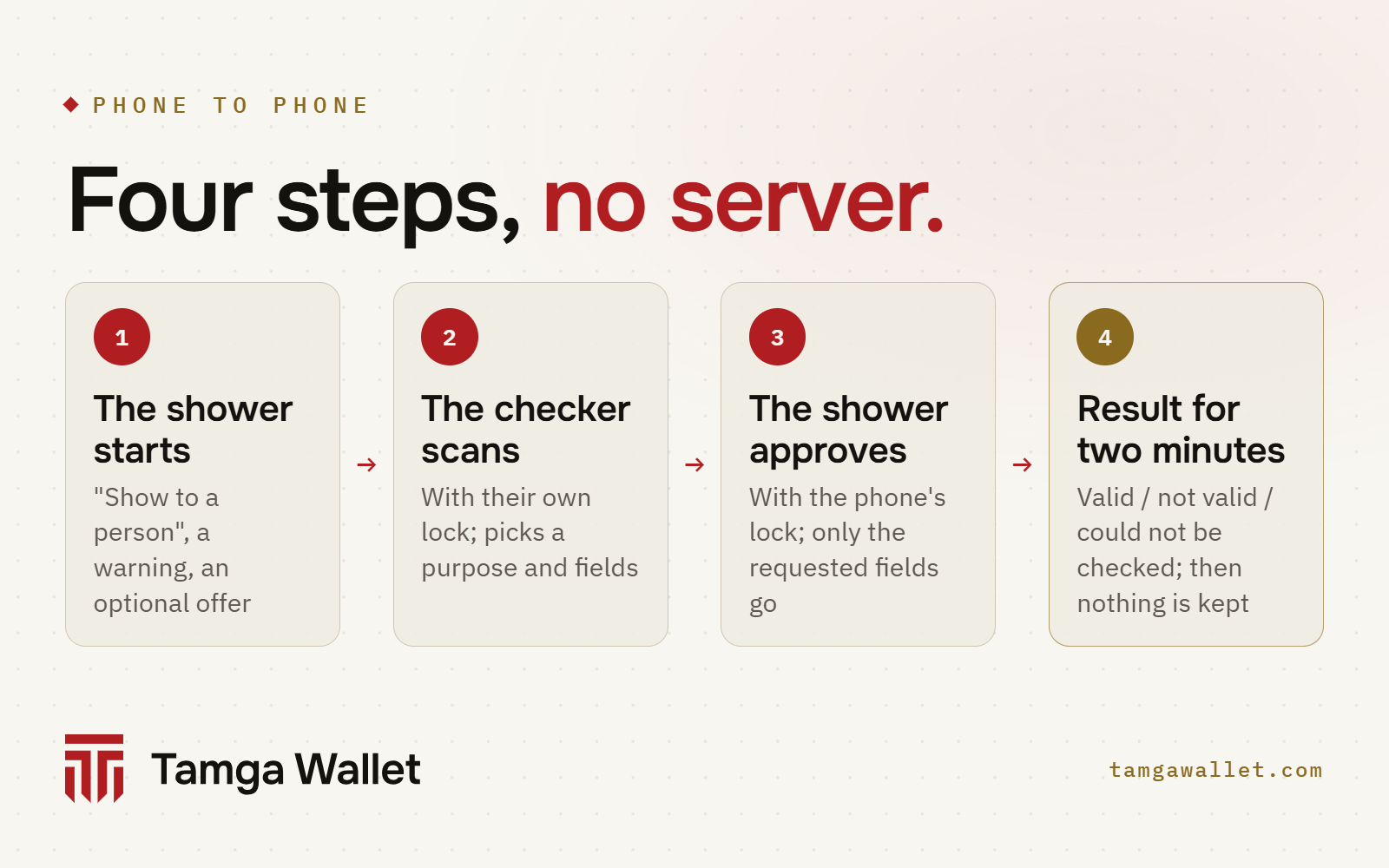
- The person showing opens "Show to a person". A full-screen warning comes first: this mode is only for showing to a person; if you are in front of a shop, an institution or a company, do not continue, because they should use the normal way of showing. You confirm with "It is a person".
- They can prepare an offer. The wallet suggests choosing in advance which fields may be asked for, for example only "over 18". The offer goes into the code on the screen, and the other phone can then only ask for those fields.
- The person checking opens "Check a person's credential". Their phone asks for its own lock first. They scan the code and choose what to check: age (over 18), who the person is (name, date of birth) or nationality. They see the list of fields and tap "Send request".
- The person showing approves. Their screen lists the requested fields. They confirm with the phone's lock and only those fields go.
- The checker sees the result. The checking phone verifies the document and shows every field it received, who issued it and whether it is valid. The screen closes after two minutes at most, and nothing is kept.
The two phones meet through the code on the screen and then talk over Bluetooth, using the international standard for showing a document in person (ISO/IEC 18013-5). No server sits in between; the conversation is encrypted between the two phones.
What can be shown, and what never?
Only the identity credential can be shown phone to phone today, and only some of its fields.
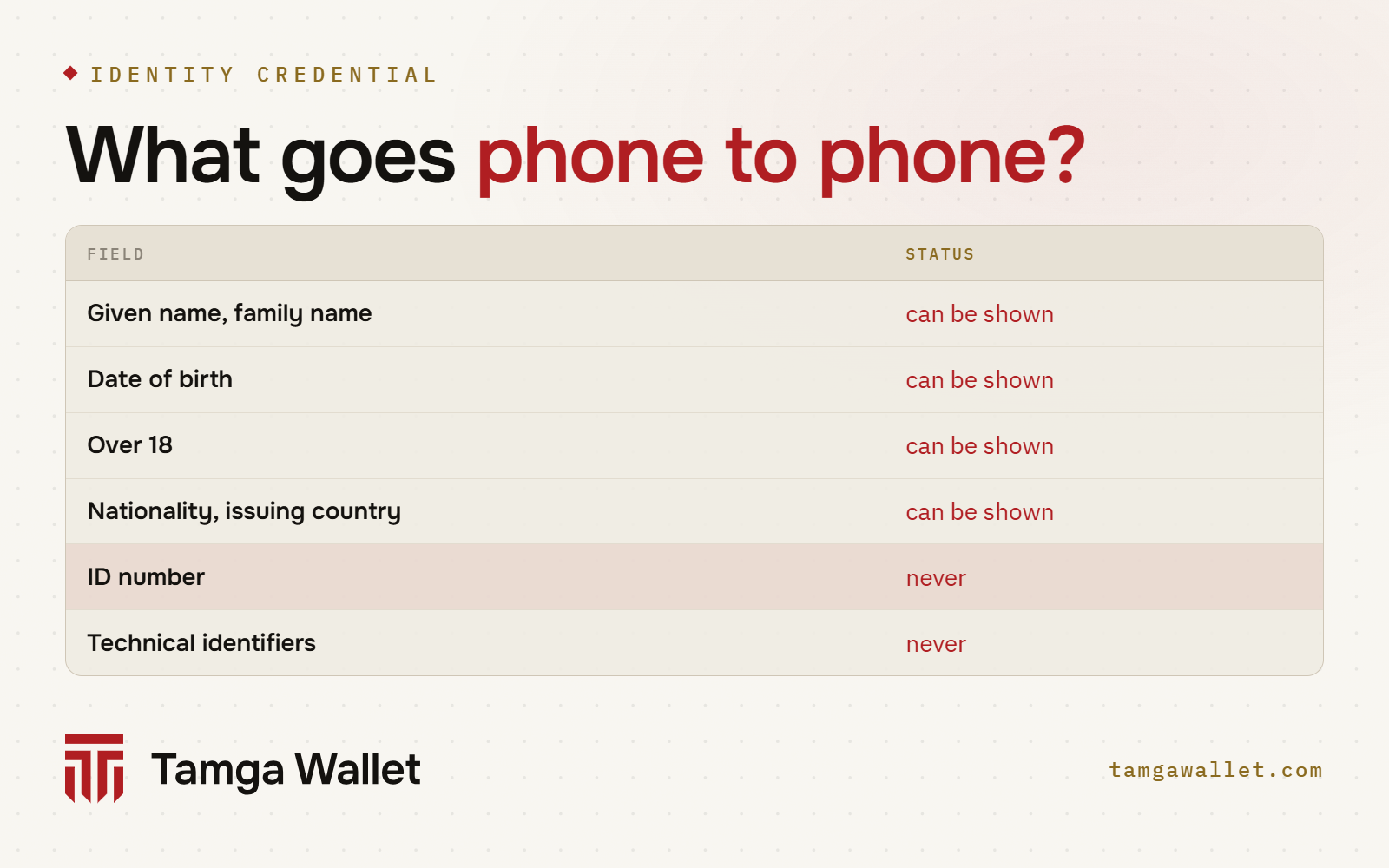
| Field | Phone to phone |
|---|---|
| Given name, family name | Can be shown |
| Date of birth | Can be shown |
| Over 18 | Can be shown |
| Nationality, issuing country | Can be shown |
| Whether the ID card's chip was read | Can be shown |
| ID number | Never, even if you want to |
| Document number fingerprint and other technical values | Never |
The ID number is left out on purpose. A number collected from person to person is easy to misuse and hard to take back, so the wallet does not send it in this mode, even with your consent. Institutional documents, such as a diploma, are not shown this way yet; and a document whose issuer allows it to be shown only to certain organisations cannot be shown phone to phone at all, because a person has no registration the wallet could check.
The identity credential has no photo. That is why the checker's result screen says plainly: this credential does not prove with a photo who is holding the phone; you can compare the name with an identity card.
How does the checking phone know the document is genuine?
The checking phone does the same checks an organisation's verifier would do, without asking anyone:
- Signature. The issuer's signature is checked against Tamga Network's signed trust list, which the wallet already holds and has verified with keys built into the app.
- Integrity and validity. The document has not been changed and has not expired.
- Possession. The document was signed in this session by the key on the showing phone, so a copied document from another phone fails.
- Authority. The issuer is allowed to issue this type of document.
- Revocation. The issuer's revocation list is read from the copy on the phone. If that copy is old and there is internet, the whole list is downloaded again, so nobody learns which entry was looked up. Without internet the result says when the list was last updated.
The result is one of three: valid, not valid (with the reason, for example "The issuer is not on the trusted list"), or could not be checked.
What stops this from being misused?
A phone-to-phone mode could become a back door: a shop could ask customers to "show to a person" instead of registering as a verifier. The rules are built to make that unattractive and to protect the person showing.
| Risk | What Tamga Wallet does |
|---|---|
| An organisation pretends to be a person | Warning at the start; on the checking side requests are limited: one every 30 seconds, at most 5 an hour, 20 a day and 50 a week |
| The checker asks for more than offered | If the request goes beyond the offer, or says it wants to keep the data, the session stops and nothing is sent |
| The checker keeps a copy | The checking phone keeps the answer only in memory: no disk, no history, no notification, no clipboard, no server; screenshots are blocked |
| The other app is not a real wallet | Europe has not yet published a common way for a checking wallet to prove it is genuine. Until it does, the showing phone says so openly, "Don't share" is the default and "Show anyway" opens after a short delay |
| A record of who checked whom | Both sides log only an in-person entry with the time and the result; the checker's log has no field values and no name |
These numbers are not ours alone. The EU's technical specification for wallet-to-wallet interactions (TS9 v1.1) made the hourly, daily and weekly limits binding, and Tamga Wallet uses those limits.
Can I use it today?
Not yet. Tamga Wallet is not in the app stores. The screens and rules described here are part of the app, and so is the Bluetooth connection between the two phones, which is meant for Android 12 or later and for iPhone. That Bluetooth code has not been tested on real phones yet; those device tests come next. Until then the app's development build can run both roles on one phone with simulated Bluetooth, only for testing.
We will announce it when the app is out.
Frequently asked questions
Does the other person need Tamga Wallet?
Today, yes. The phone-to-phone mode follows the EU's specification, so other European wallets that implement it should be able to join later. We have not tested that yet, so we cannot promise it today.
Can the person checking me save my details?
The checking phone does not save them anywhere: not to disk, history, notifications or a server, and screenshots are blocked. The result screen closes within two minutes. Of course, nothing stops a person from writing down what they saw, so show only what is needed.
Why can't I show my ID number, even if I want to?
Because a number collected from person to person is a common way into fraud and is hard to take back. The wallet never sends it in this mode.
Does the internet need to be on?
No. The phones talk over Bluetooth and the checking phone uses the trust list and revocation list it already holds. If those copies are old, the result says so.
Can a shop use this mode instead of registering?
It should not, and the wallet warns the person showing. The request limits on the checking side make the mode impractical for a shop; organisations use the normal way of showing, where they are registered and you see who they are.
Sources
- EU Digital Identity Wallet Architecture and Reference Framework 3.0, Topic 30 "Wallet to Wallet interactions" (GitHub)
- EU technical specification TS9, Wallet to Wallet interactions, v1.1 (GitHub)
- ISO/IEC 18013-5:2021, Mobile driving licence (mDL) application, ISO
- Regulation (EU) 2024/1183 (eIDAS 2.0)
- Showing only what is needed · Showing the same document twice
Related
- Article · ConceptsSelective disclosure: showing just one line of a documentSelective disclosure lets you show one field of a signed document, such as "is a student", while the rest stays hidden and the signature still checks out.
- Article · PrivacyWhy two places that see the same document can't link youTamga Wallet gives each verifier its own copy of a document and each site its own pseudonym, so two places can't match you by comparing notes.
- Article · StandardsISO 18013-5 and mdoc: showing a document face to faceISO/IEC 18013-5 defines mdoc, the format and protocol for showing a document from your phone to a reader in person, over Bluetooth, offline.
- Article · PrivacyProving your age without showing your date of birthWhen a site only asks "over 18?", Tamga Wallet proves just that answer. Your date of birth, name and the credential itself are not shown.
- Article · ConceptsWhat is a verified document, and why is it hard to fake?A verified document carries the institution's signature, is checked against a signed trust list and revocation list, and works only with your phone's key.
Step-by-step help is in the Guide
Everything from setup to a lost phone, with the app’s own screens.
Tamga Wallet is coming soon
Coming soon to the App Store and Google Play. Carry your diploma, student card and tickets on your phone.
Coming soon to the App Store and Google Play